
A phishing email does not have to fool you for long. It has to fool you for the four seconds between reading the subject line and clicking the button — before you have thought about who actually sent it. That is the entire attack, and it is why the defence is not intuition but a habit: the same short sequence of checks, run on any message that asks you to log in, pay, or hurry.
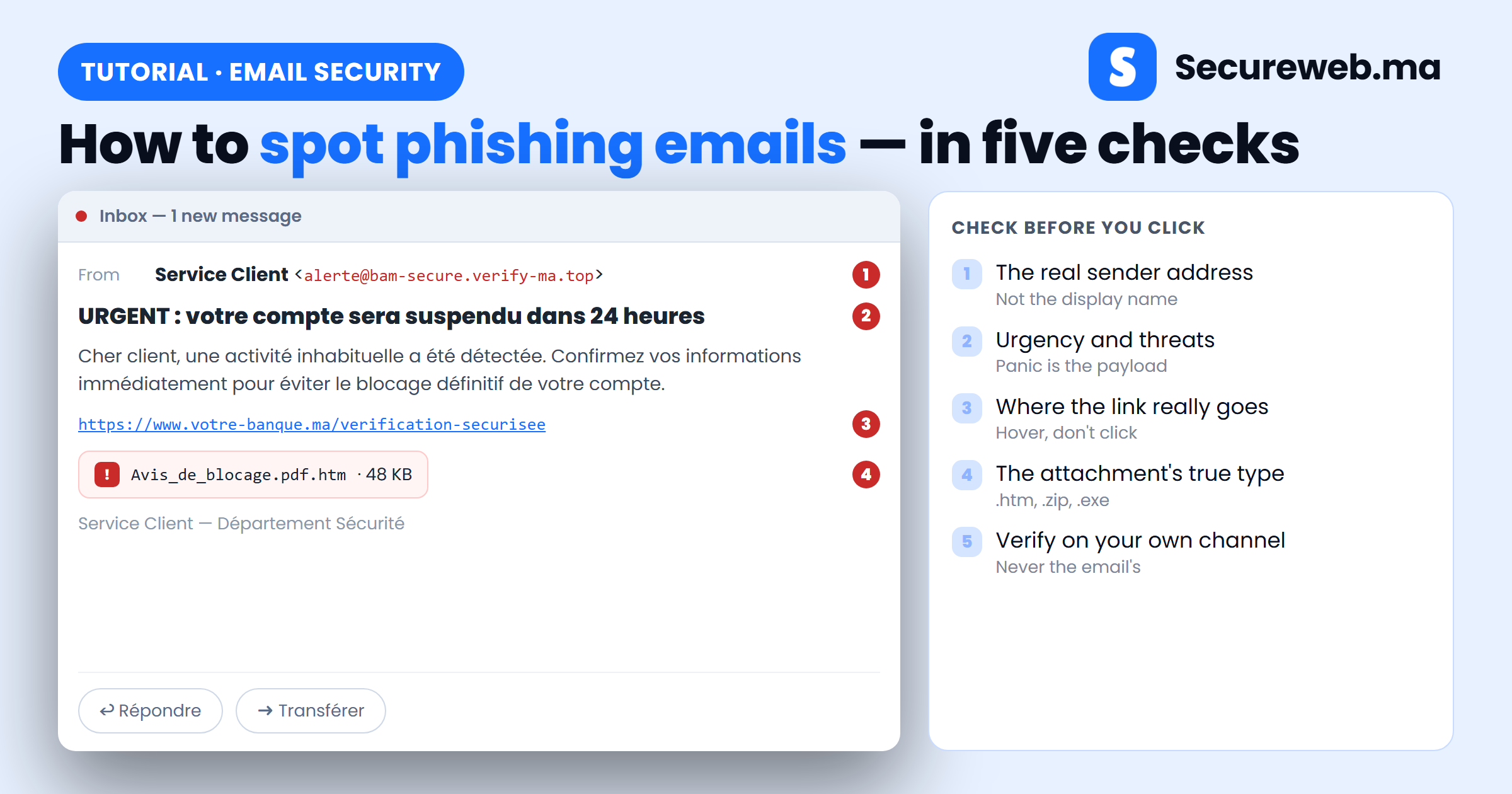
This tutorial shows you how to spot phishing emails in five checks, in the order that catches the most fakes with the least effort: who really sent it, what it is doing to you, where the link goes, what the attachment is, and how to verify independently. Each step tells you exactly what to look at, with a screenshot of what you should see. At the end there are four real-world examples, what to do in the first ten minutes if you already clicked, and where to report it in Morocco.
What it actually takes to spot phishing emails
A phishing email is a message that impersonates someone you trust — your bank, your hosting provider, Microsoft, a colleague, a supplier — to make you hand over credentials, approve a payment, or run a file. It is the entry point for the majority of breaches we are called in to clean up, because it skips every technical defence and negotiates directly with the person holding the password.
Modern phishing no longer looks like the clumsy scams of ten years ago. Machine translation fixed the broken French and Arabic. Free certificates gave every scam site a padlock. Kits clone a bank’s login page pixel for pixel, and some of them relay your one-time code to the real site while you are still typing it. Spelling mistakes are a bonus clue, not a reliable test — which is why the five checks below look at structure: the sending domain, the pressure, the link destination, the file type, and whether the message can survive being verified elsewhere.
Before you start
- Do not click anything yet — not the link, not the attachment, not the unsubscribe button, and never “reply to confirm”.
- Read it on a desktop or laptop if you can. Phone mail apps hide the sender’s real address and make links impossible to hover — most people who fall for phishing are on a phone, in a hurry.
- Turn on visible file extensions in your file manager once (Windows Explorer → View → File name extensions; macOS Finder → Settings → Advanced). It takes ten seconds and defeats a whole class of disguise.
- Know your own baseline: which providers actually email you, and from which addresses. A “delivery notice” from a courier you never used is answered before it is opened.
The whole sequence takes about a minute. If any single check fails, stop — you do not need the other four.
Step 1 — Check who really sent it
The name you see in your inbox is a label the sender chose. Anyone can put “Service Client” or your CEO’s name in it. The only part that matters is the address behind it, so click the sender name to expand the full header.
Read the domain — the part after the @ — from right to left, and compare it letter by letter with the domain you know. Attackers register neighbours that read correctly at a glance: an extra word (bam-secure.verify-ma.top), a swapped character (rn for m, 0 for o), a different ending (.top, .info, .online instead of .ma). Then look at two fields most people never open: mailed-by, which shows the domain that actually sent the message, and reply-to — a bank does not take replies at a free Gmail address.
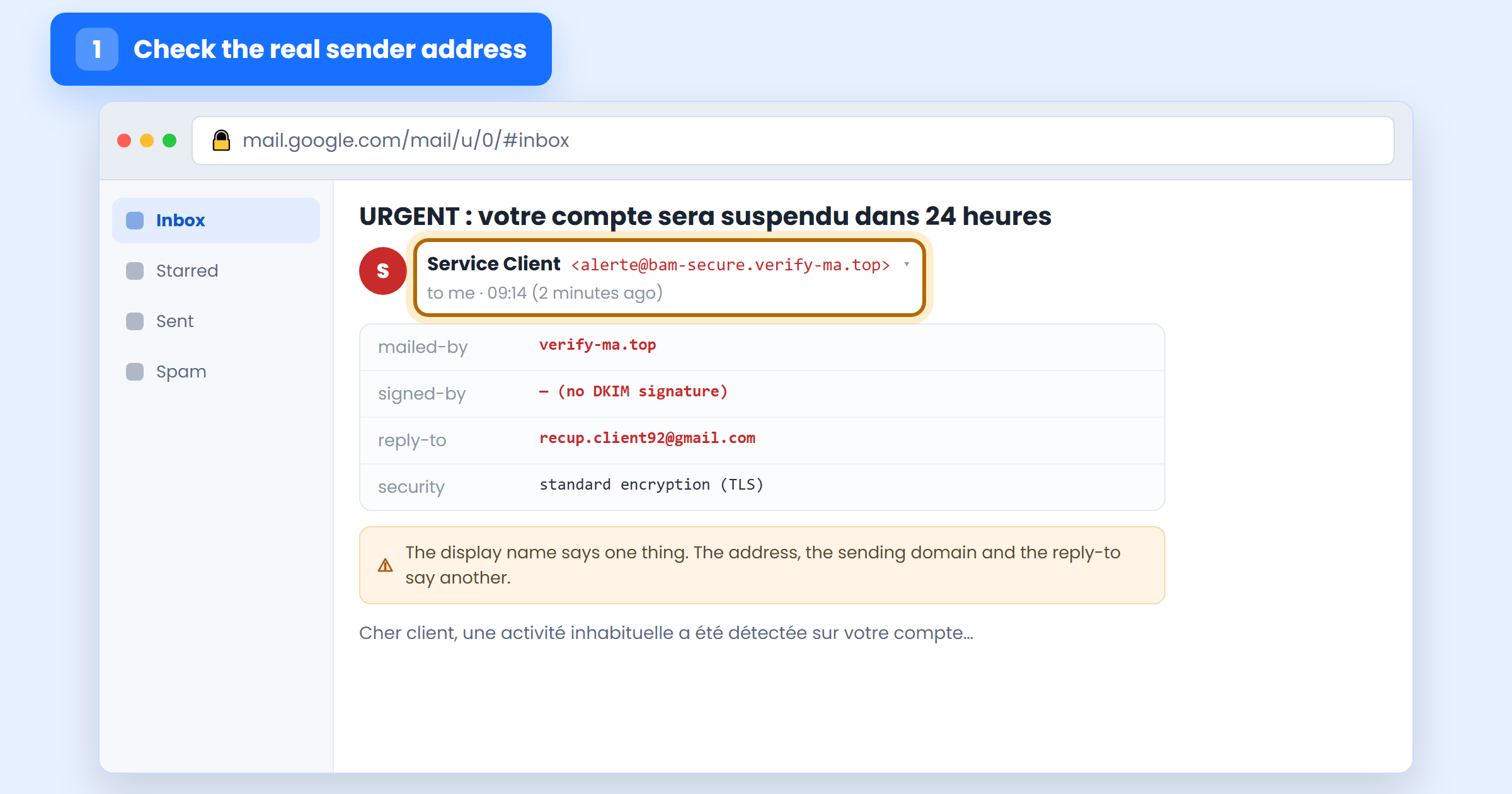
One warning, because it is where people get caught being clever: a correct sender address does not prove the message is genuine. Addresses can be spoofed outright when the sending domain has weak SPF, DKIM and DMARC records, and a compromised supplier’s real mailbox sends perfectly authentic mail. The sender check is a fast filter, not a verdict — which is why step 5 exists.
Step 2 — Read the pressure, not just the words
Every phishing email has the same job: get you to act before you verify. So stop reading the message for content and read it for pressure. A deadline (“dans 24 heures”), a threat of loss (suspension, a fine, a blocked delivery), an unexpected reward, a demand for secrecy, or an instruction to break your normal procedure “just this once” — these are the mechanism, and they show up even in messages with flawless grammar.
Add the small tells: a generic greeting where your name should be (“Cher client”, “Dear user”) from a company that has your name on file; a service you do not use; an invoice for something you did not buy; a subject line that fakes a conversation with Re: or Fwd: when there was none.
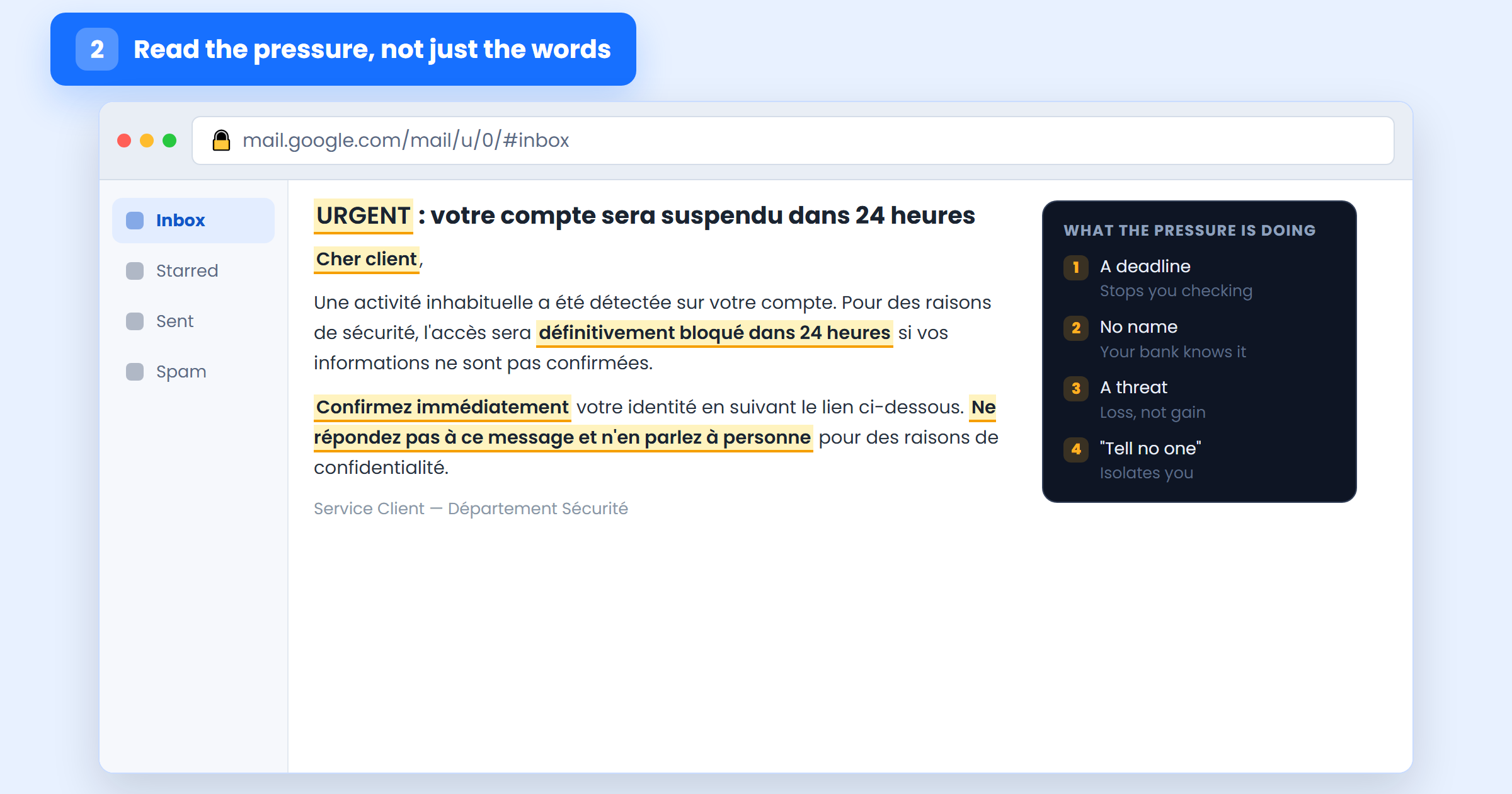
The business version of this is more expensive and much quieter: a supplier “changing bank details” before an invoice is due, or a manager asking urgently, from a phone, for a transfer or a set of gift cards. The tone is polite and there is nothing to click — the payload is the instruction itself. Treat any change of payment details as a phishing attempt until you have confirmed it by phone on a number you already had.
Step 3 — Hover every link before you click it
Link text is decoration; the destination is what counts. Rest your mouse on the button or link without pressing, and read the real URL in the status bar at the bottom-left of the window. On a phone, press and hold the link until a preview appears, then dismiss it.
Read the destination right to left again. The real site is the last name before the first single slash: in https://www.votre-banque.ma.verify-ma.top/login, everything to the left of verify-ma.top is decoration the attacker typed. Watch for the padlock argument too — HTTPS on a phishing page proves only that the connection is encrypted, not that the site is who it claims to be. And treat shortened links (bit.ly and friends) in a security or payment email as a red flag on their own: a legitimate bank has no reason to hide its own address.
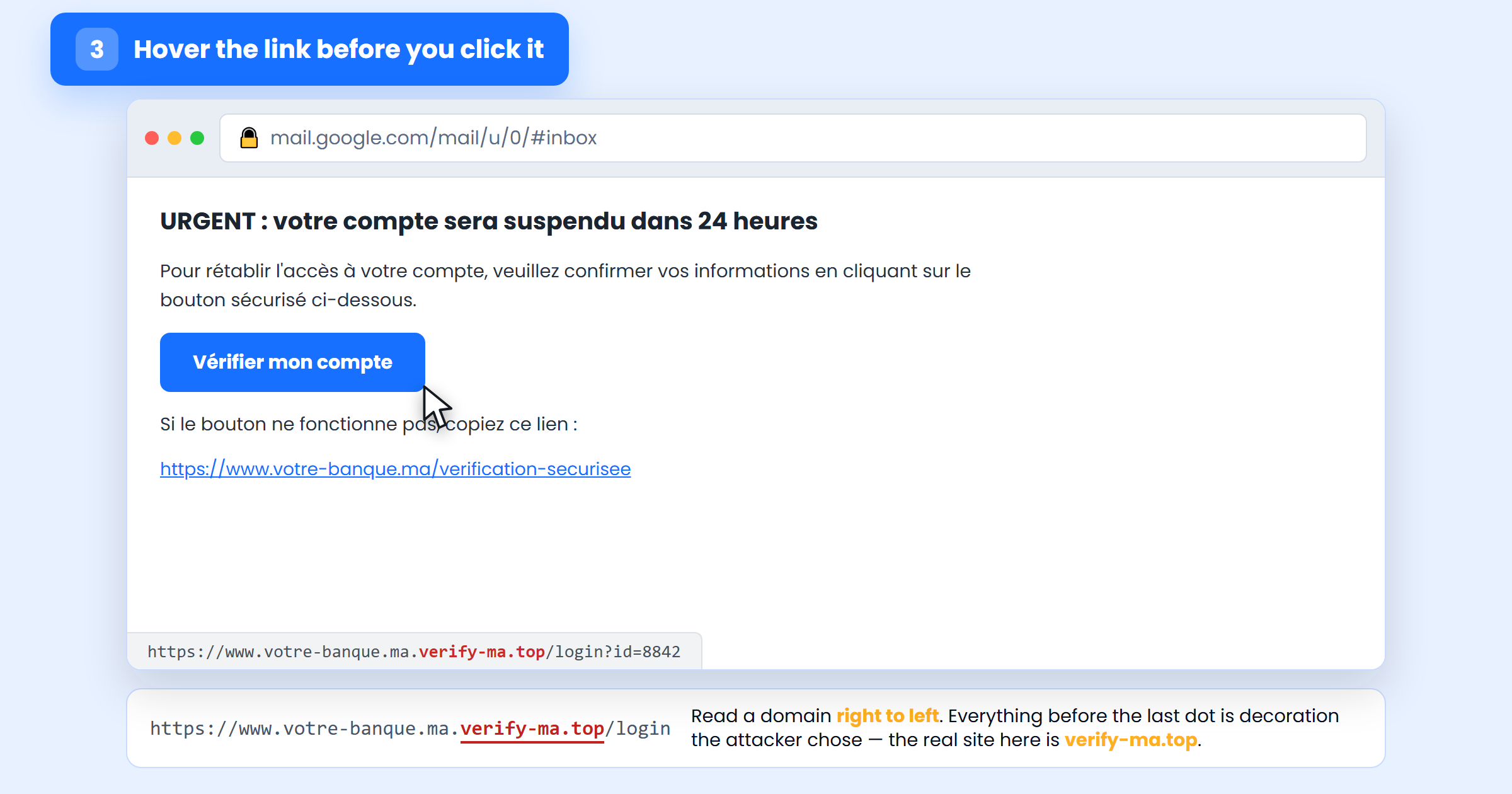
If you want the mechanics of what a single click can actually do — and what it cannot — our explainer on whether you can get hacked by a link goes through it properly.
Step 4 — Look at what the attachment really is
An unexpected attachment is a file a stranger wants to run on your computer. Before opening anything, read the full file name, extension included — this is why you turned extensions on.
- Double extensions —
Facture.pdf.htm,Devis.pdf.exe. The last one is the real one. A.htmattachment is a web page: it opens a fake login form inside the file, where no URL check can warn you. - Executables and scripts —
.exe,.scr,.msi,.bat,.js,.vbs. No supplier sends an invoice as a program. - A password-protected archive with the password in the email body. That is not confidentiality; it is a way to stop your mail provider’s scanner from seeing what is inside.
- Office files that ask you to “enable content”. That prompt is asking permission to run macros — code. Legitimate documents do not need it.
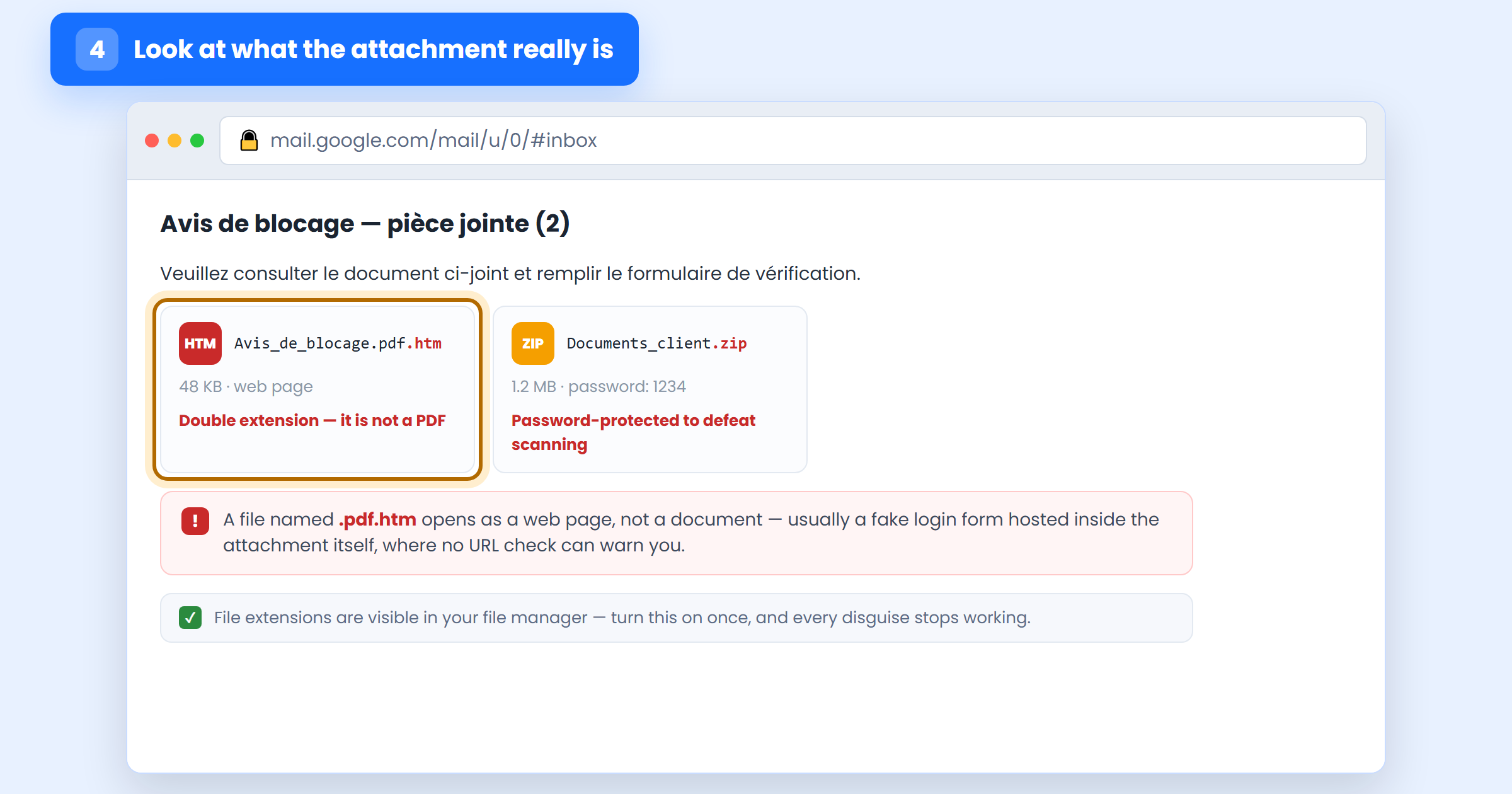
If you genuinely need to see a suspicious document, do not open it locally. Ask the sender — on a channel you already trust — to paste the content into the message body, or view it in a sandbox. Nothing an attachment contains is worth the machine it runs on.
Step 5 — Verify on a channel the email did not give you
This is the check that works even when the other four pass, and it is the only one that is close to unbeatable. Never verify a message using anything the message itself provided — not its link, not its phone number, not its “customer service” address. Those all lead back to the sender.
Instead, use a route you already had: type the address by hand or use your own bookmark, open the provider’s mobile app, or call the number printed on the back of your card or on your last invoice. Then look for the same alert there. A real suspension, a real unpaid invoice and a real security warning will all be waiting for you inside your account. If nothing is waiting, the email was a lie.
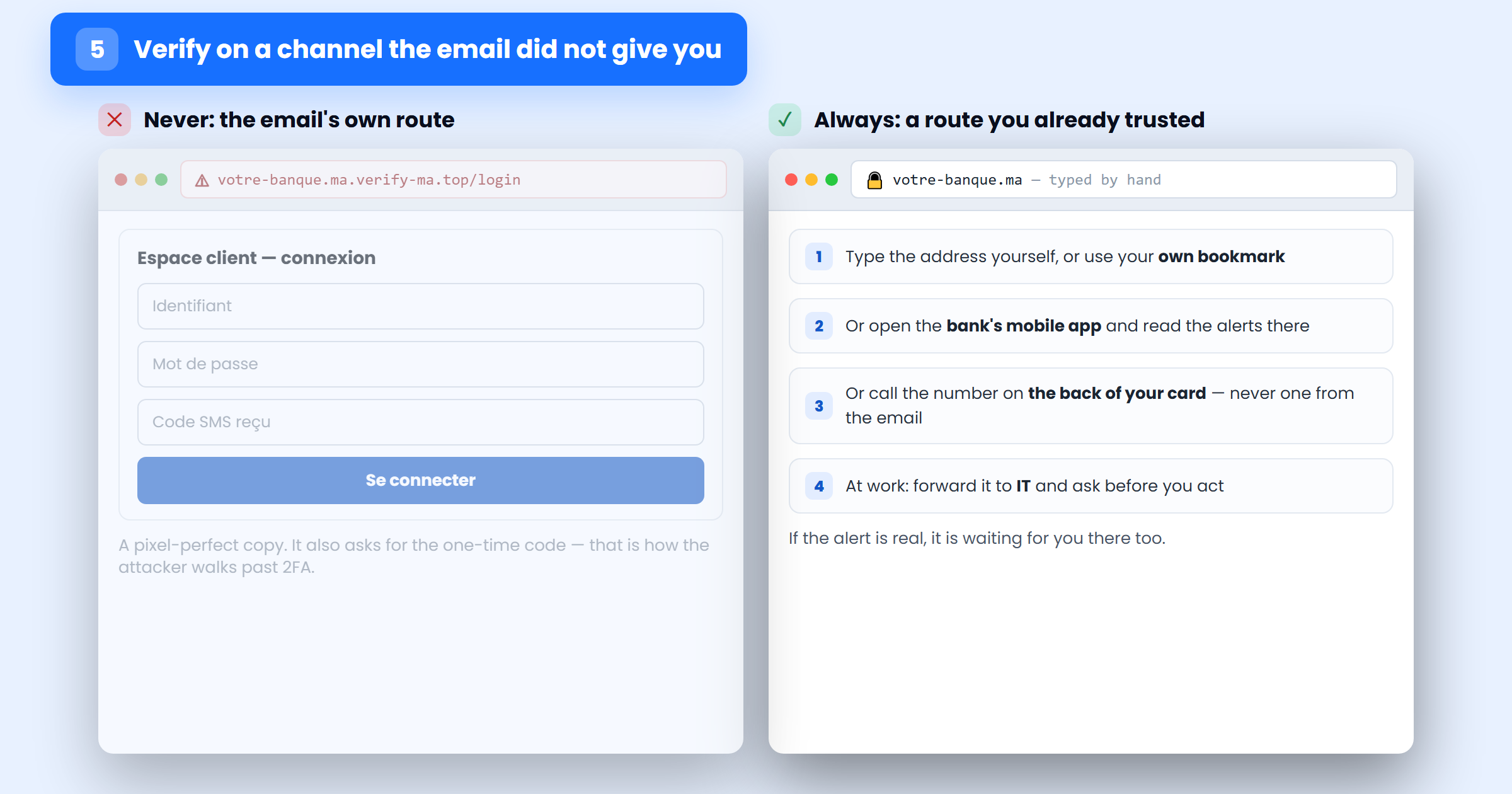
At work, make this the rule rather than a personal habit: anything involving credentials, payment details or an urgent transfer gets confirmed on a second channel, and nobody is ever criticised for taking the extra two minutes. Attackers rely on the fact that questioning an “urgent” request from a manager feels rude.
Four real examples, and what gives them away
1. “Your account has been suspended”
A bank, a telecom operator or a social network warns that access will be blocked unless you confirm your details within 24 hours. It is the most common phishing template in Morocco, and the most effective, because losing access to your money is a genuine fear.
What gives it away: the deadline (step 2) and the destination domain (step 3). Real suspensions are visible when you log in yourself — banks do not restore access through a link in an email.
2. The prize, the refund and the parcel fee
You have won something, you are owed a tax refund, or a package is held at customs pending a small fee. The amount requested is always small enough not to be worth arguing about — the goal is your card number, not the 30 dirhams.
What gives it away: you did not enter, you were not owed, you did not order. Any unexpected win is a lure; any real customs charge is payable through the carrier’s own site, which you reach yourself (step 5).
3. “Unusual activity detected on your account”
A security alert imitating PayPal, Microsoft 365 or Google reports a suspicious sign-in from an unfamiliar country and invites you to “review the activity”. The page it leads to asks for your password, then the one-time code — which the attacker replays into the real site within seconds.
What gives it away: the sender’s domain (step 1) and the fact that a genuine alert never needs your code. Check the real service’s own security page for the same alert; it will be there if it happened.
4. The helpful colleague, supplier or “IT department”
Someone inside the story asks for something reasonable: IT needs you to re-authenticate after a “migration”, a supplier sends updated bank details for this month’s invoice, HR shares a document requiring a login. Often it comes from a real, compromised mailbox — so the address is perfect.
What gives it away: only step 5. Call the person on the number you already have, and never on the one in the signature of the message you are checking.
You already clicked. What to do in the first ten minutes
Clicking a link is not the same as being compromised, and panic costs more time than the incident. Work down this list in order:
- Did you type anything? If you only opened the page, close it and move to point 4. If you entered a password, keep going.
- Change that password immediately — from a different device if you can, starting with the affected account, then anywhere you reused it. Our guide to creating a strong password covers what to replace it with.
- Sign out all sessions and check the account’s security settings: active devices, recovery email and phone, and mail forwarding rules. Attackers add a hidden forward so they keep reading your mail after you change the password.
- If it involved money — card details, a transfer, banking credentials — call your bank now and ask them to block the card and watch the account. Speed decides whether the transaction can be stopped.
- If you opened an attachment, disconnect the machine from the network and run a full antivirus scan. On a work computer, tell IT before you do anything else — including before you delete the email.
- Report it, then tell your colleagues. Phishing arrives in waves; if one inbox received it, others did too.
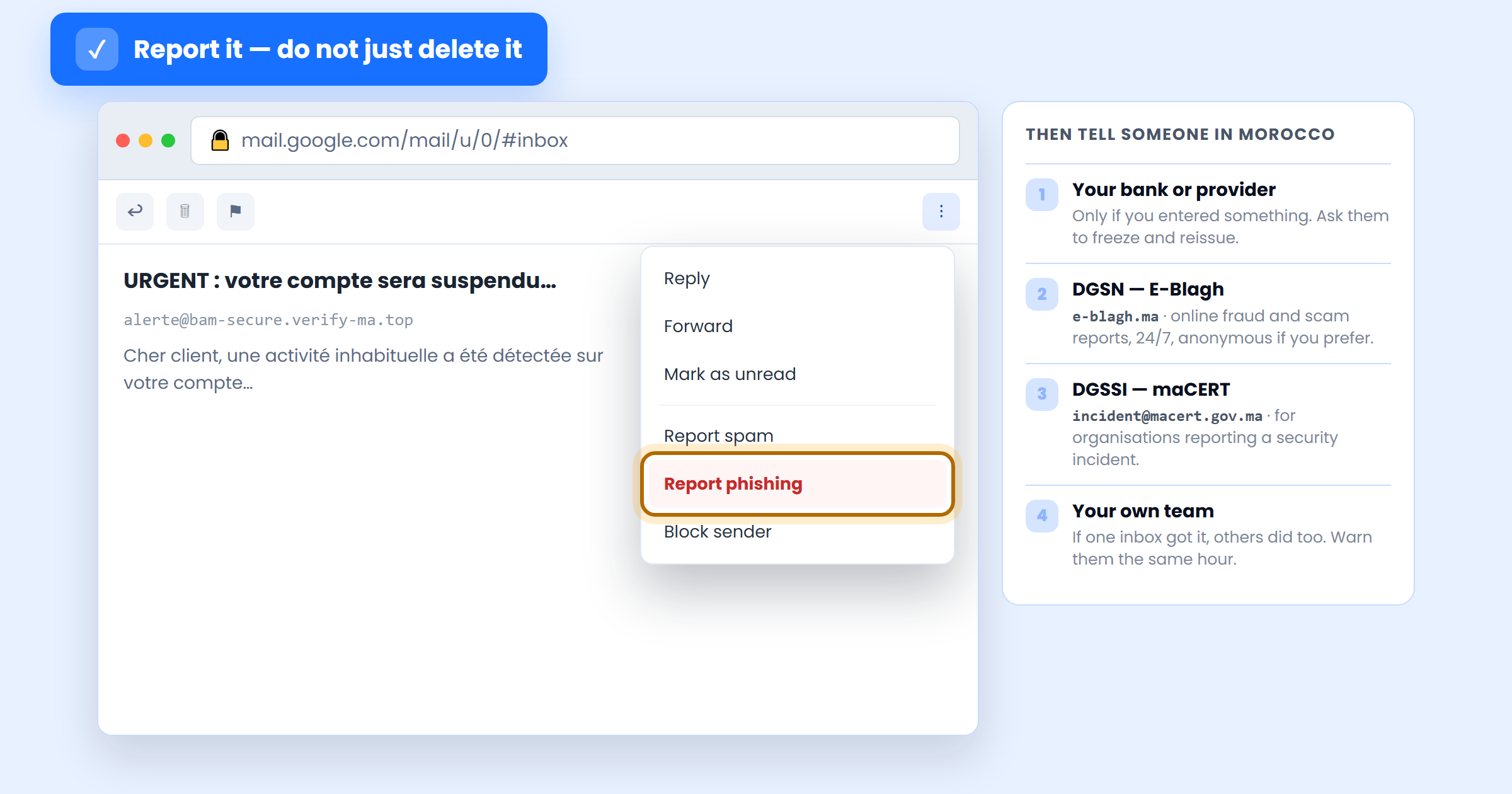
Use your mail client’s Report phishing option rather than simply deleting the message — that is what teaches the filter to catch the next wave for everyone. In Morocco, online fraud and scam messages can be reported to the DGSN through its E-Blagh platform, anonymously if you prefer, and organisations dealing with a security incident report it to the DGSSI’s maCERT. If money moved, file a complaint with the judicial police as well — your bank will ask for the reference. Our overview of Moroccan cybersecurity laws explains where these obligations come from.
Test yourself — and then test your team
Knowing the five checks and performing them under pressure at 5pm on a Friday are different skills. The fastest way to find out which one you have is to be tested on realistic messages rather than on obvious fakes.
SecureWeb’s free cybersecurity awareness test does exactly that: about seven minutes for the employee track, roughly ten for the developer one, covering phishing, passwords and everyday security decisions. It is free, it needs no technical background, and it gives each person a clear picture of where their reflexes fail — which is far more useful to a Moroccan business than another slide deck nobody reads.
Then run the quick self-check below on the next suspicious message that arrives:
- Can you name the sending domain, character for character, without scrolling back?
- What exactly is the message pushing you to do, and how soon?
- Where does the link actually go — the last name before the first single slash?
- Is there an attachment, and what is its real extension?
- What independent channel would confirm this, and does the same alert appear there?
Keep phishing away from your own website and inbox
The checks above protect the person reading the mail. These protect the business sending it — and stop your domain being used against your own customers:
- Publish SPF, DKIM and DMARC records for your domain. Without them, anyone can send mail that appears to come from your company — and your customers have no way to tell.
- Put two-factor authentication on every mailbox and admin account. A stolen password alone should never be enough, on your inbox or your CMS.
- Protect your forms with reCAPTCHA and email verification, so your contact form is not a free relay for scam messages.
- Filter the submissions that reach you — our anti-spam tool keeps phishing and junk out of the inbox your team actually reads.
- Harden the site itself, so a stolen credential does not become a defacement or a malware host — the full sequence is in our guide on how to secure your website.
Frequently asked questions
Can you get infected just by opening a phishing email?
Almost never with a modern, updated mail client — the danger is in what you click, open or type afterwards. Two caveats: remote images load when the message is displayed and tell the sender your address is live, and an out-of-date mail application is itself a vulnerability. Keep image loading off by default and your software patched.
The email came from a real colleague’s address. Is it still phishing?
It can be — either their mailbox is compromised, or the domain is spoofed. This is precisely why a correct sender address is not proof and step 5 is not optional. Confirm out of band, and if their account really is compromised, they will want to know within the hour.
Does two-factor authentication mean I can stop worrying about phishing?
No, but it raises the cost enormously. Modern phishing kits proxy the login in real time and ask for the SMS or app code as well, so a determined attacker can still get through. App-based codes beat SMS, and hardware keys or passkeys defeat this class of attack outright because they refuse to authenticate on the wrong domain.
Is a message with a padlock and good French safe?
No. Certificates are free and machine translation is excellent, so both signals are now cheap for attackers to buy. Judge the domain, the destination and the independent verification instead — those are the parts an attacker cannot fake without also controlling the real service.
How to spot phishing emails: the bottom line
You do not need to recognise every scam. You need one habit that does not depend on how convincing the message is: check who really sent it, notice what it is pressuring you to do, look at where the link goes, read the attachment’s real extension, and verify on a channel the email did not give you. Any message that survives all five is almost certainly genuine — and any message that fails one never needed the rest.
If you take three things from this tutorial: never verify a request using contact details supplied by that same request, turn on file extensions today, and treat a request for a one-time code as an attack in progress. Those three cover the overwhelming majority of what we see. And a broader look at how these campaigns are built is in our explainer on understanding phishing attacks.
Want to know how your team would actually react? SecureWeb runs phishing awareness testing and full security audits for Moroccan businesses — starting with the free awareness test above, which takes seven minutes and tells you where to begin.