
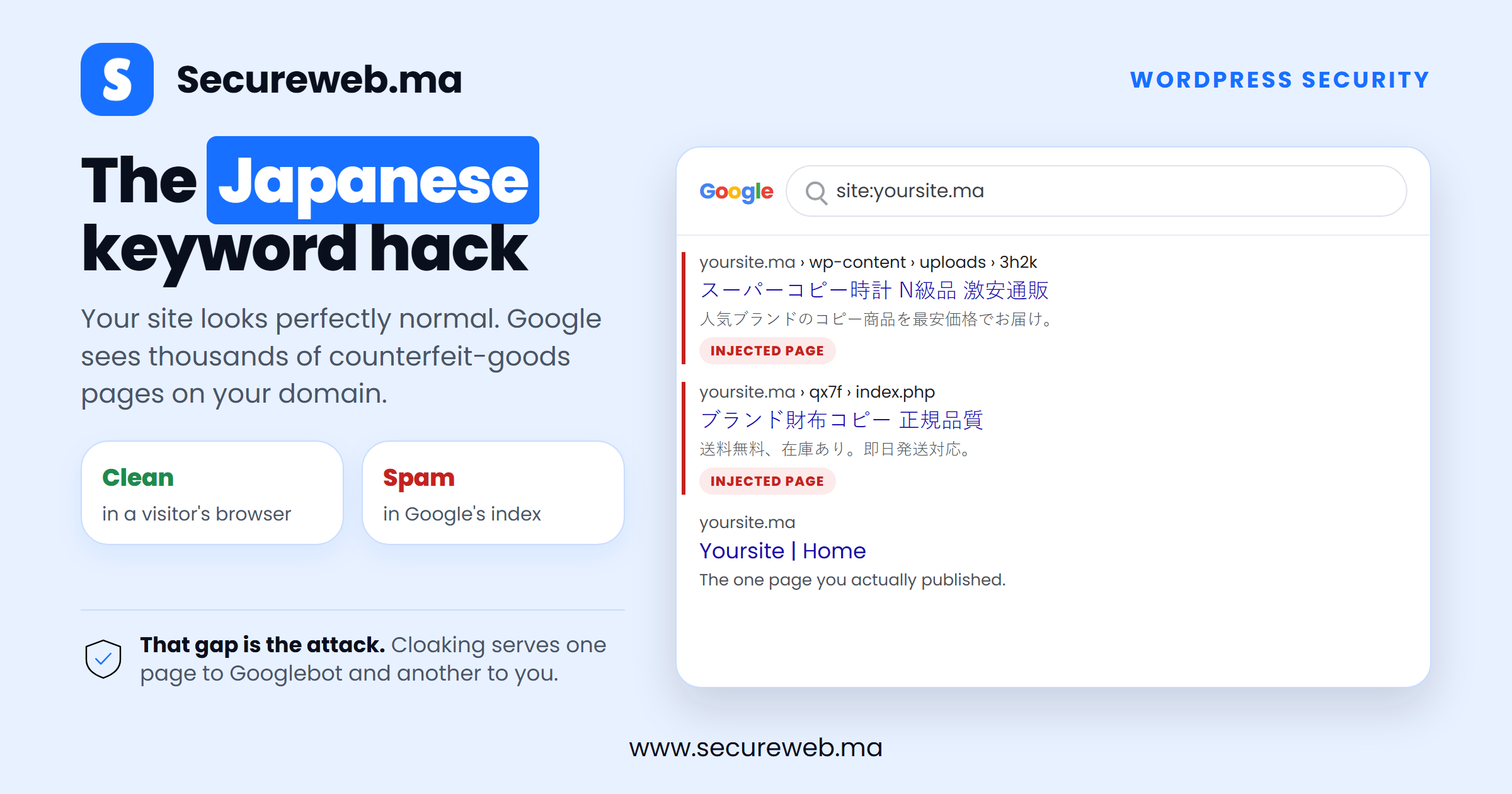
The Japanese keyword hack is one of the quietest ways a WordPress site gets taken over. Your site looks completely normal when you open it. But search for your own brand on Google and you find pages of Japanese text selling counterfeit watches and handbags, all published under your own domain name.
Nothing visible on your homepage changed, and that is exactly the point. This attack targets what Google sees, not what your visitors see, so most owners only discover it weeks later when their traffic collapses or a customer sends them a screenshot.
This guide explains what the attack does, how to confirm your site has it, and the exact steps to clean a WordPress site and get your real pages back into search results.
What the Japanese keyword hack actually does
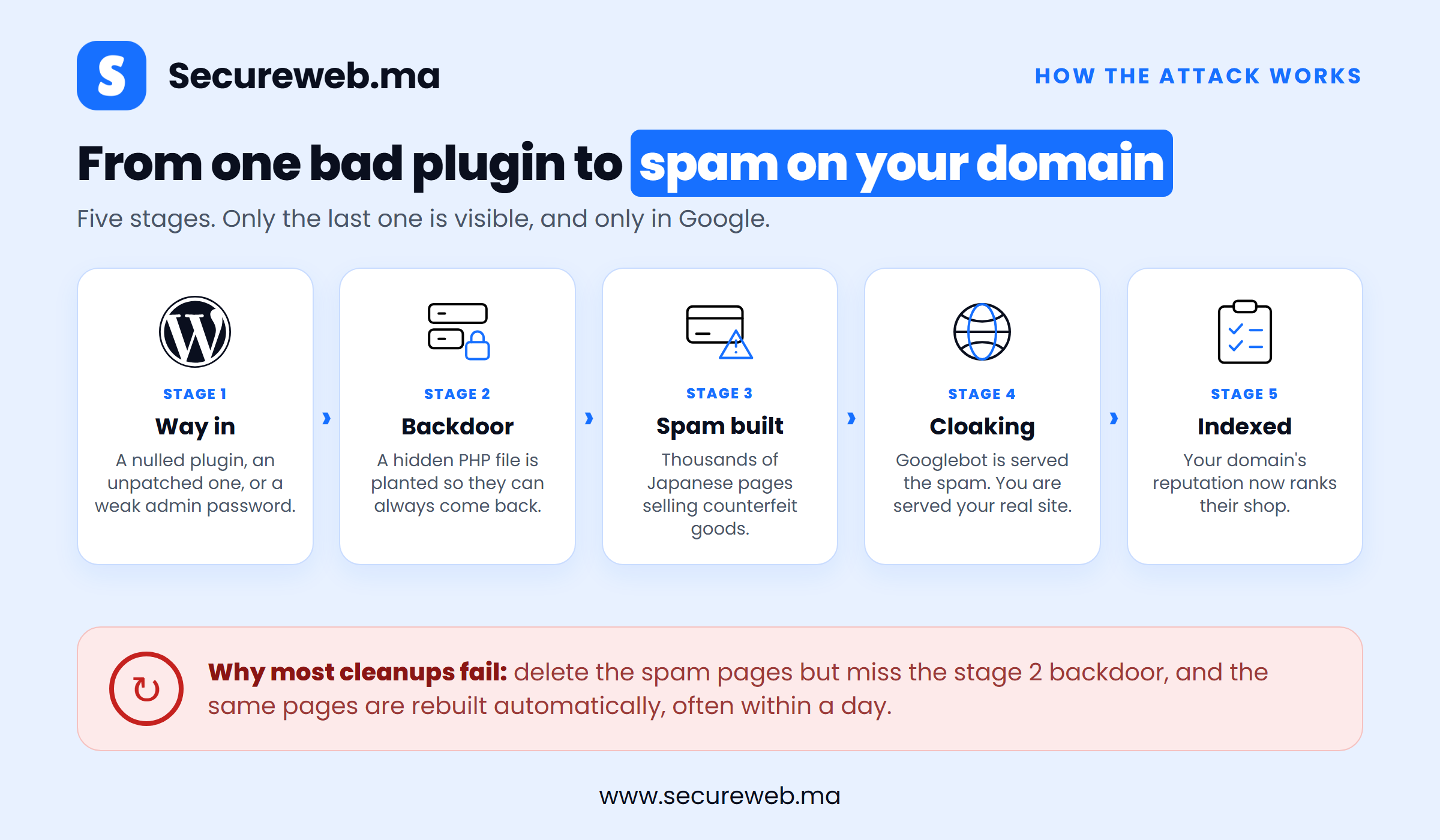
The Japanese keyword hack (also called Japanese SEO spam) is a form of search engine poisoning. An attacker gains write access to your site and uses it to generate thousands of spam pages in randomly named folders, each filled with auto-generated Japanese text and affiliate links to shops selling fake branded goods.
Those pages were never meant for your visitors. They exist to rank in Google using the reputation your domain has already earned. Every sale made through the affiliate links pays the attacker, while your domain absorbs all of the damage.
Two details make the attack unusually hard to notice:
- Cloaking. The injected code checks who is requesting the page. Googlebot is served the spam version, while a normal browser is served your real page. That is why the site looks perfectly healthy to you.
- Stolen Search Console access. Google reports that attackers often add themselves as a verified owner of your property, which lets them submit spam sitemaps and change your settings from the inside.
Morocco has seen this first hand: the CNDP, the national data protection authority, had its search listings replaced by Japanese spam pages in exactly this way. It is a useful reminder that this attack selects its targets by weak software, not by the importance of the organisation behind the site.
How to tell if your site has the Japanese keyword hack
Run these four checks in order. The first two take about a minute each.
- Search
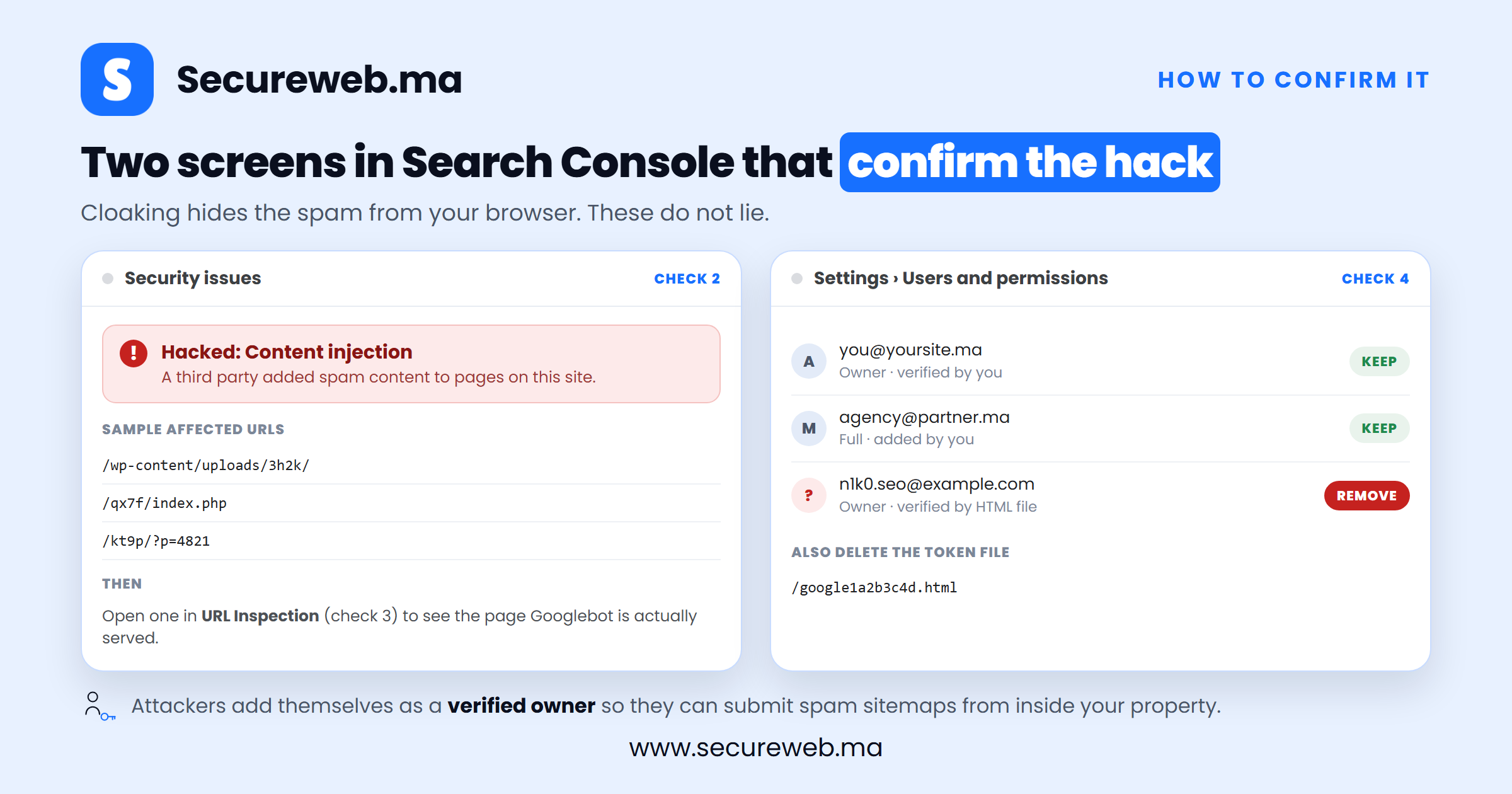
site:yourdomain.maon Google. Page through the results. Japanese titles, or folder names you never created, mean spam pages are already indexed. - Open Search Console and go to Security Issues. Google flags hacked content here once it detects it. An empty report is not proof that you are clean, because detection often lags behind the infection by weeks.
- Run the URL Inspection tool on one of the suspicious URLs. Because of cloaking, this is the only reliable way to see the content Google actually receives.
- Check Search Console under Settings, then Users and permissions. Remove every verified owner you do not personally recognise.
Inside WordPress itself, look for administrator accounts you never created, published posts in a language you do not write in, and sitemap files you never generated. A free website security scan will also surface injected files you would otherwise have to find by hand.
How the attack gets in, and why it keeps coming back
Nearly every case begins at one of four doors:
- Nulled (pirated) themes and plugins. The crack itself is the malware. This is by far the most common entry point.
- An outdated plugin with a public vulnerability. Automated bots scan the whole web for these within days of disclosure.
- A weak or reused administrator password that was guessed or taken from an unrelated data breach.
- Stolen hosting, FTP or database credentials, which bypass WordPress security entirely.
Once inside, the attacker plants a backdoor: a small PHP file that lets them walk back in even after you delete every spam page. This is the single reason most cleanups fail. The owner removes the visible spam, feels relieved, and watches identical pages reappear within days because the backdoor was never found.
How to fix the Japanese keyword hack, step by step
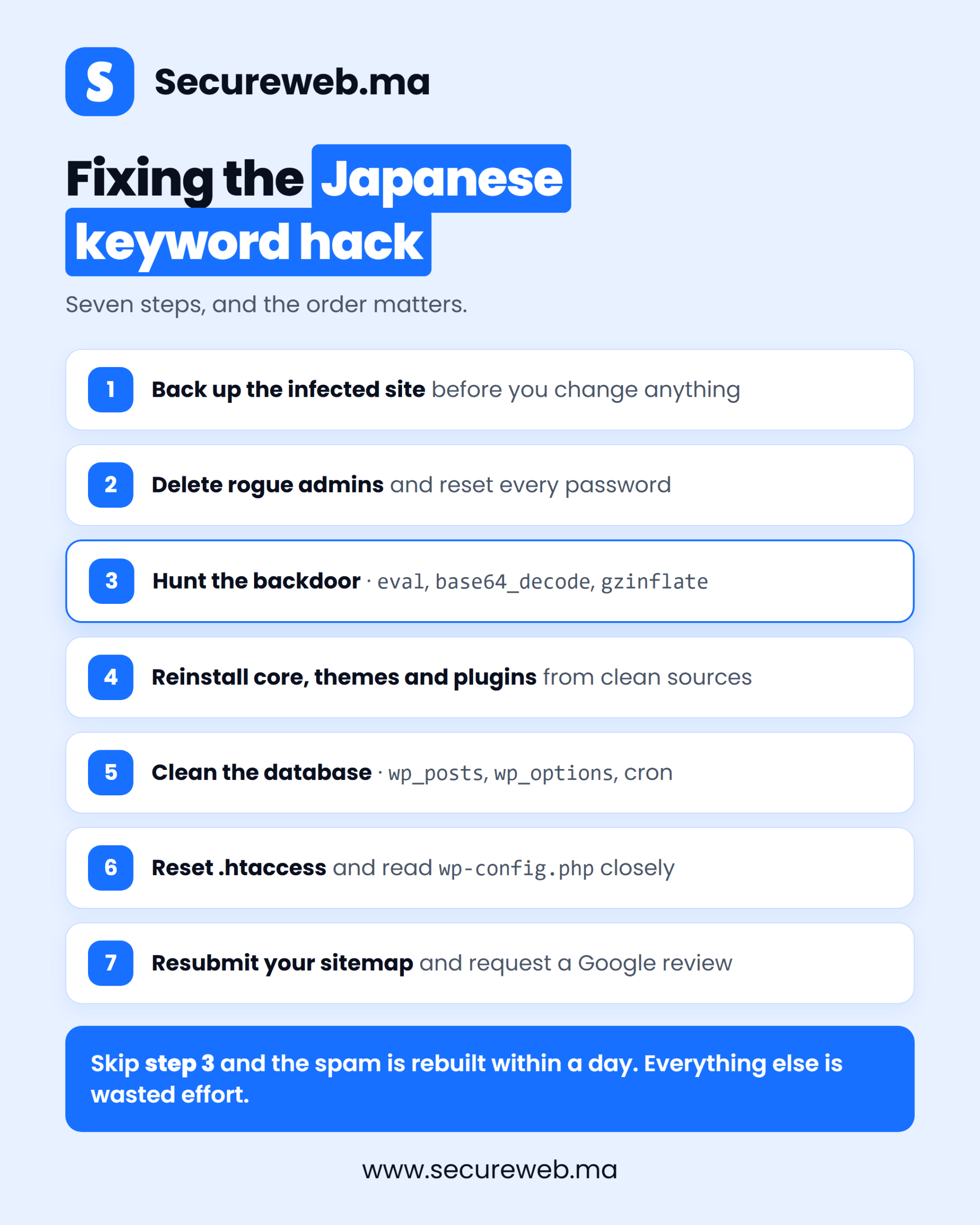
Work through these in order. Steps 1 to 3 contain the attacker, steps 4 to 6 remove the infection, and step 7 restores your search presence.
1. Back up the infected site before you change anything
Copy the full file system and export the database first, even though both are infected. If a cleanup step breaks the site you can roll back, and the copy preserves the evidence of how the attacker got in.
2. Lock the attacker out
Delete every administrator account you do not recognise, then reset the passwords on the accounts that remain. Rotate your hosting panel, FTP/SFTP and database passwords too, and use a genuinely strong, unique password for each one. Cleaning a site while the attacker still holds valid credentials achieves nothing.
3. Find the backdoor
This is the step that decides whether the hack returns. Sort every file on the server by last modified date and look closely at anything changed around the time the spam appeared. Then search your files for the functions obfuscated backdoors rely on: eval, base64_decode, gzinflate, str_rot13 and strrev. Check wp-content/uploads as well, because a .php file in an images folder is never legitimate.
4. Replace core, themes and plugins with clean copies
Do not try to repair infected files one by one. Download a fresh copy of WordPress and overwrite everything except wp-content and wp-config.php, then reinstall each theme and plugin from its official source. Delete anything you are not actively using, and delete every nulled theme or plugin permanently rather than updating it.
5. Clean the database and remove the spam pages
In phpMyAdmin, search wp_posts for the injected Japanese entries and delete them. Review wp_options for unfamiliar entries and injected redirect rules, and check the cron entry there for scheduled tasks, which attackers use to reinstall their backdoor automatically.
6. Reset .htaccess and review wp-config.php
The cloaking rules usually live in .htaccess, and there is often more than one on the server, including hidden copies in subfolders. Replace each with the default WordPress version. Then read wp-config.php closely: anything appended below the closing tag, or any unfamiliar include, is hostile.
7. Remove the spam from Google and request a review
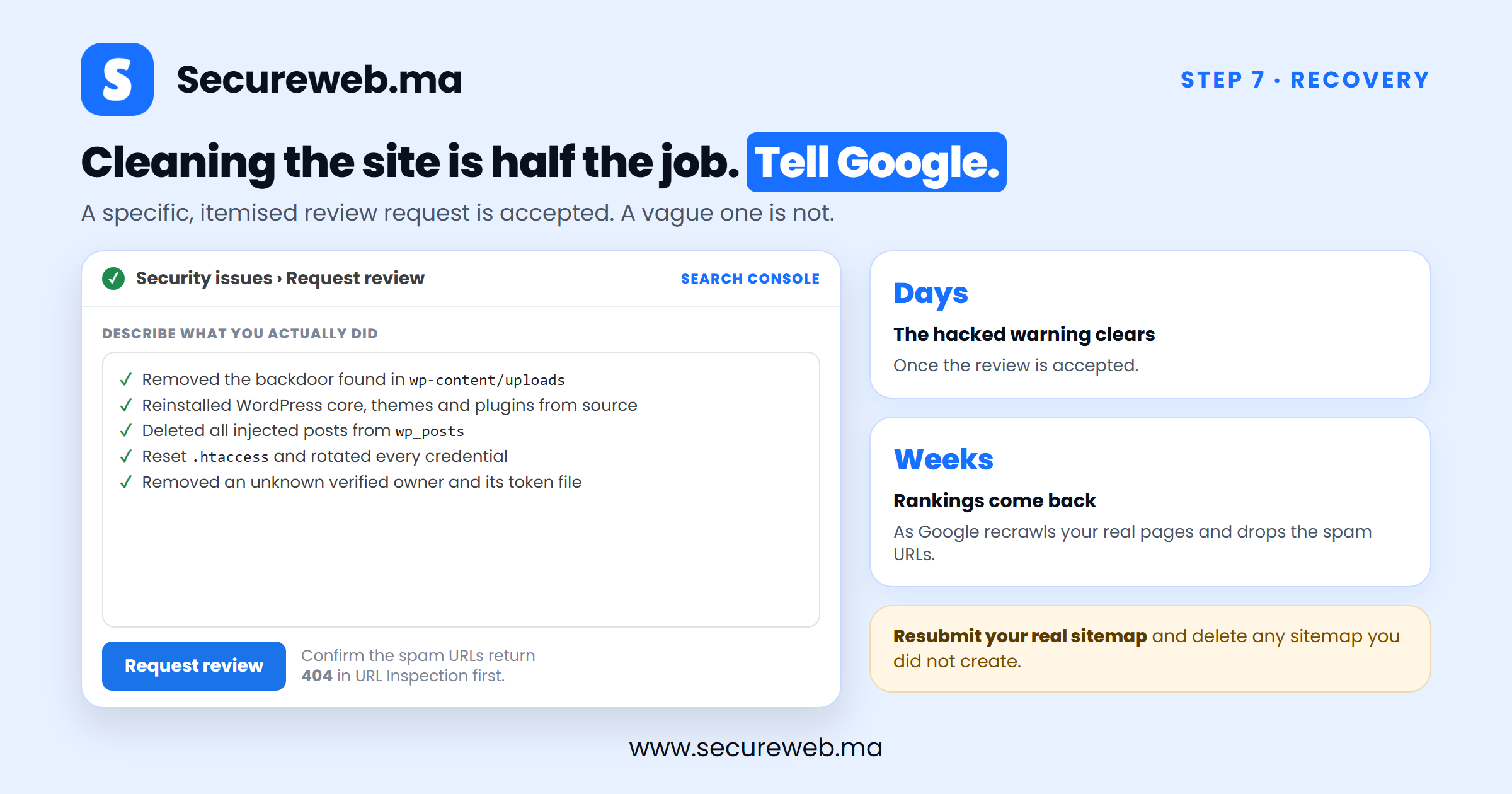
Confirm with the URL Inspection tool that the spam URLs now return “not found”, then submit your genuine sitemap again and delete any sitemap you did not create. Finally, open Security Issues in Search Console and request a review. Describe what you cleaned and how, because a vague request is usually rejected.
If any of this is beyond what you can do safely on a live business site, our hacked website recovery service handles the whole process, including the search recovery afterwards.
How to stop the Japanese keyword hack from returning
A cleaned site with the same weaknesses gets reinfected. Close the door properly:
- Never install nulled themes or plugins. No exceptions, on any site.
- Update WordPress, themes and plugins weekly, and remove anything you no longer use.
- Turn on two-factor authentication for every administrator account.
- Limit login attempts so password guessing cannot run at volume.
- Disable the file editor by adding
define('DISALLOW_FILE_EDIT', true);towp-config.php. - Keep automated off-site backups and check that they actually restore.
- Watch Search Console, and enable its email alerts so Google can warn you early.
Our full WordPress hardening guide walks through each of these controls in detail.
Frequently asked questions
Why is the spam in Japanese?
Because the counterfeit goods are aimed at Japanese shoppers, a market where demand for fake luxury brands is high and keyword competition is low. The language tells you who the buyers are, not where the attacker is.
Will Google penalise my website?
Your site can be flagged as hacked in search results and lose rankings quickly. This is not a permanent penalty, though. Once the site is genuinely clean and your review request is accepted, the warning is lifted, which is why security and SEO are the same problem in practice.
Can I just delete the spam pages?
No. Deleting the pages removes the symptom, not the cause. Unless the backdoor from step 3 is found and removed, the spam is regenerated automatically, often within a day.
How long does it take to recover rankings?
The hacked-site warning usually clears within a few days of an accepted review. Rankings themselves recover more gradually, over several weeks, as Google recrawls your genuine pages and drops the spam URLs from its index.
The bottom line
The Japanese keyword hack is not a sophisticated attack. It succeeds because it is silent, and because it usually arrives through something the owner chose to install. Pirated plugins and skipped updates open the door, and a domain’s search reputation, built over years, is what gets spent.
If you think your website has been hit by the Japanese keyword hack, contact us for a free malware scan and a website security audit.