
Almost every new website we are asked to test today was written, at least partly, by an AI assistant. The code compiles. The buttons work. The client is happy. Then we run a penetration test, and within an hour we are logged in as the admin. Vibe coding security is the gap between “it works” and “it is safe”, and right now that gap is where most of the risk in new web projects lives.
“Vibe coding” means describing what you want in plain language and letting an AI write the code. The problem is that speed hides the parts nobody sees, authentication, permissions, secrets, and file handling. This guide shows you the real, simple flaws we keep finding in AI-built apps, and gives you the prompts, checks, and habits that close them.
Vibe Coding Security: Why Working Code Is Not Safe Code
An AI assistant is trained to give you something that runs. It is not trained to protect your business. Ask it for a login page and you get a login page, one that works perfectly for the honest user and often just as well for the attacker.
The numbers back up what we see in the field. In Veracode’s Spring 2026 GenAI Code Security update (published 24 March 2026), AI models produced syntactically correct code more than 95% of the time, but only 55% of that code passed security tests. Across 80 coding tasks and more than 150 models, the results barely improved as the models got smarter. For cross-site scripting in particular, the pass rate was around 13–15%.
Secrets tell the same story. GitGuardian’s State of Secrets Sprawl 2026 found 28.65 million new hardcoded secrets in public GitHub commits during 2025, and reported that AI-assisted commits leak secrets at more than twice the rate of human-only commits (3.2% versus 1.5%).
So the honest summary is this: the AI is a fast junior developer with no memory of your threat model. It will not tell you what it left out. Good vibe coding security means you have to ask.
Real Vibe Coding Security Failures We Found in Penetration Tests
These are some findings from real penetration tests SecureWeb carried out on recently launched, AI-assisted applications. None of them required a clever exploit:
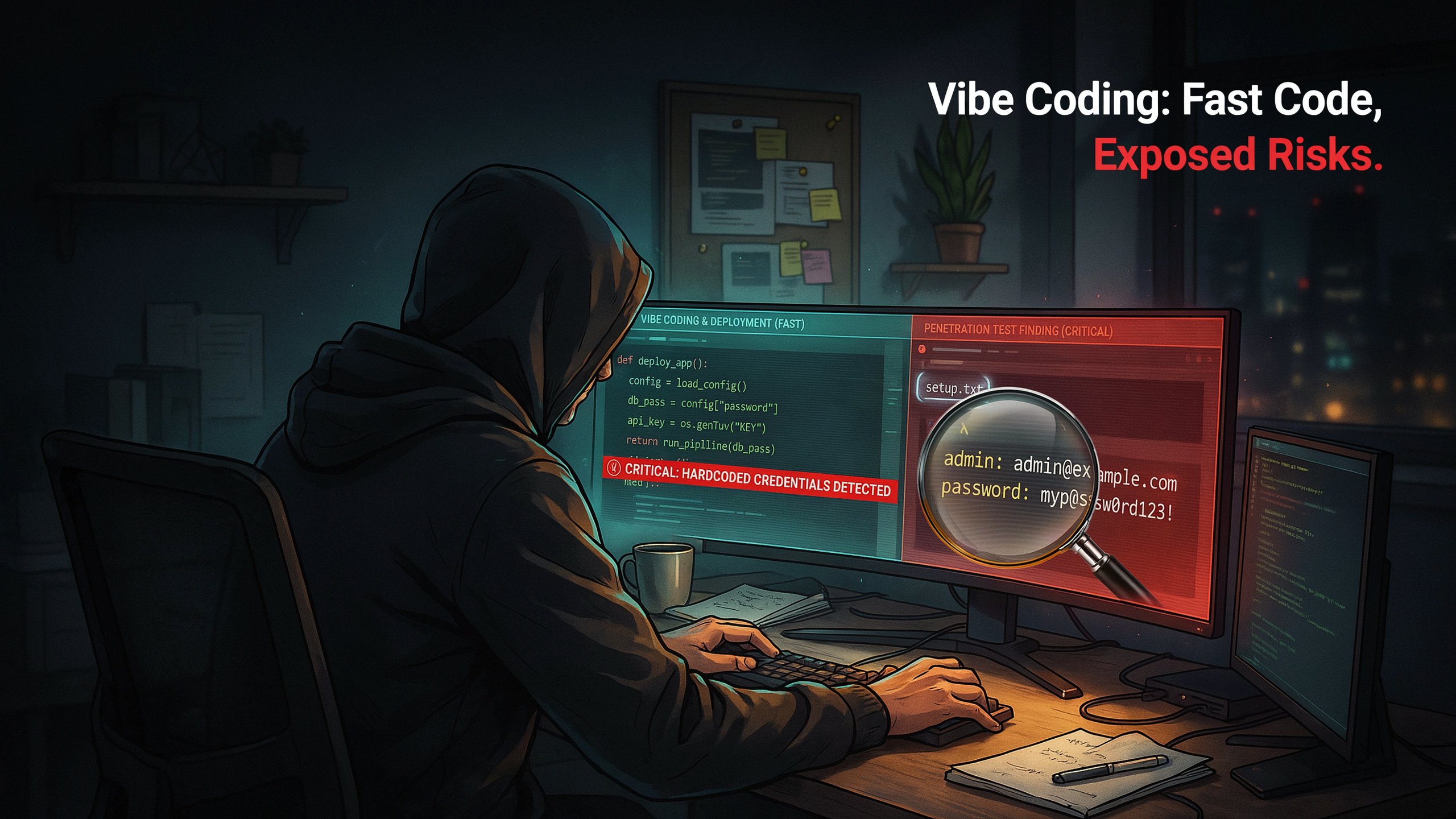
1. Setup.txt file contains Admin password
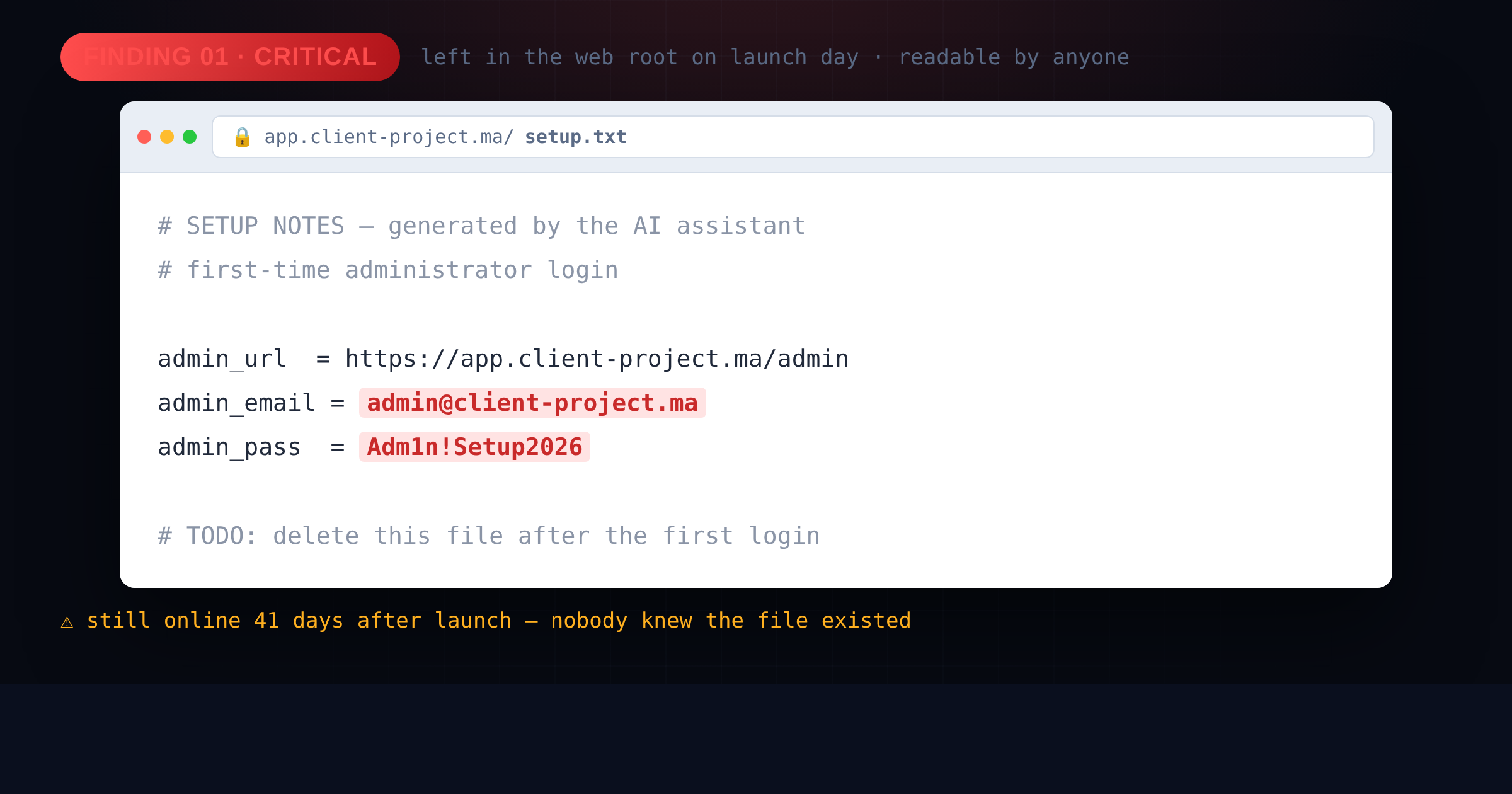
A client launched a new platform on a fresh subdomain. While mapping the site, we requested a few common filenames and found one that should never have existed: setup.txt, sitting in the web root and readable by anyone with a browser.
The AI had generated it as a convenience note for the developer during the build, a short “here is how you log in the first time” file. It contained the admin email and password, in plain text. Nobody deleted it before going live, because nobody knew it was there.
We used it. Full administrative access, in under ten minutes, without touching a single vulnerability scanner.
This class of problem is not exotic. Leftover install files, backup archives, .env copies, and readable directories are the first thing an attacker checks. If your server also allows browsing folders, the search gets even easier.
2. Signup form that granted admin role to any user
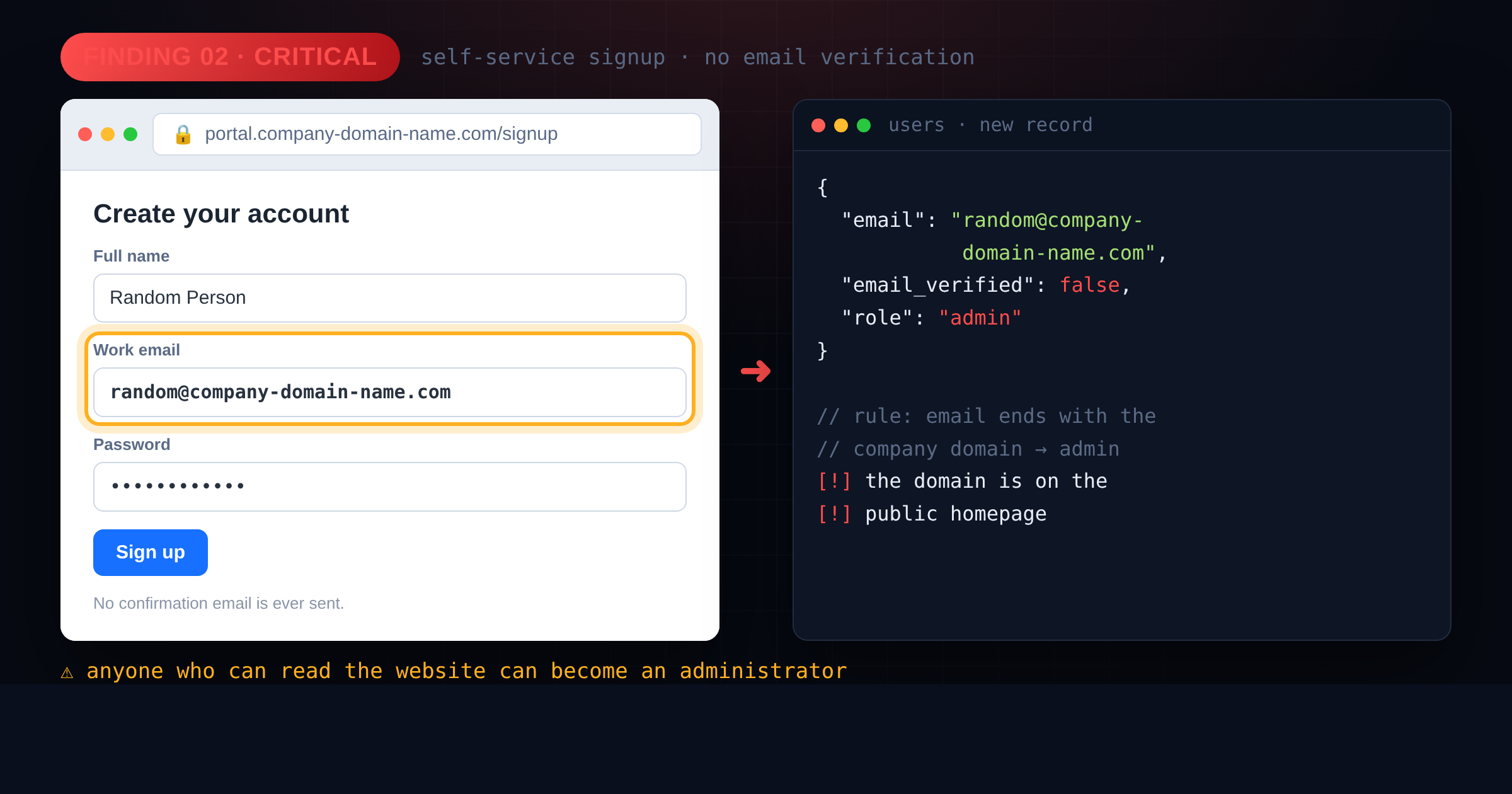
A second client had an internal tool where staff could register themselves. The intended logic was reasonable: employees use their work email, so people with a company address should get elevated access.
What the AI actually implemented was a check on the text of the email address. If the string ended in @company-domain-name.com, the new account was created as an administrator. There was no email verification step, no confirmation link or code, nothing that proved the person actually owned that mailbox.
That means anyone who knew the company’s domain name (which is written on the homepage) could sign up as random@company-domain-name.com and land in the admin dashboard. We reported it the same day.
The underlying flaw is one of the most common on the web: trusting input the user controls, and never separating Authentication (proving who you are) from Authorisation (what you are allowed to do). It sits at the top of the OWASP Top 10 as Broken Access Control.
The pattern behind almost every finding
Different clients, different stacks, same story. The bugs we find in vibe coded apps are simple, but critical, and they exist because:
- Speed was the only goal.
- Nobody read the code.
- The AI was never asked for security.
- Development shortcuts reached production. Test accounts, debug endpoints, default passwords, no rate limiting, no logging….
These overlap heavily with the developer mistakes in cybersecurity we have documented for years. AI did not invent them. It just made it possible to produce them a hundred times faster.
How to Improve Vibe Coding Security: A Practical Tutorial
You do not need to become a security engineer. You need a short, repeatable routine before anything goes live. Here is the one we recommend to clients who build with AI.
Step 1 : Ask the AI for security, explicitly
The single highest-value change is how you prompt. Vague requests get vague security. Compare these two:
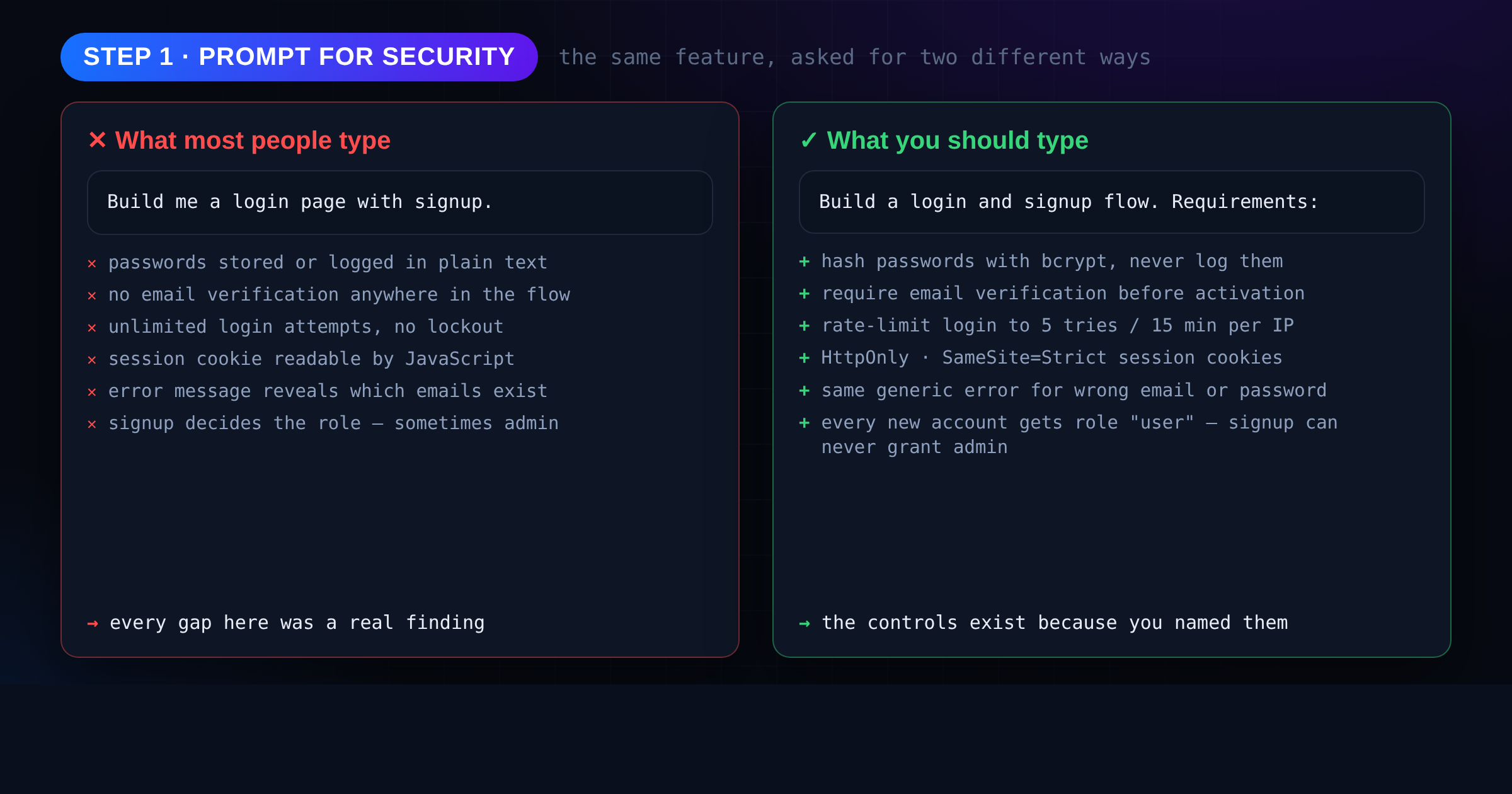
The second prompt produces meaningfully different code. Keep a short list of prompts like this and reuse them:
Review prompt — run this on every file the AI writes:
“Review this code as a security auditor. List every vulnerability you find, with severity, the exact line, and a fixed version. Check specifically for: hardcoded secrets, SQL injection, XSS, missing authorisation checks, insecure direct object references, missing input validation, and anything that trusts user-supplied data.”
Cleanup prompt — run this before deployment:
“List every file in this project that exists only to help development: setup notes, seed data, test accounts, debug routes, example credentials, backup files. For each one, say whether it is safe in production and what to do with it.”
Treat the answers as a to-do list, not as gospel. The AI will miss things, but it will also catch things you would never have looked for.
Step 2 : Hunt for secrets and leftover files
Before launch, go looking for exactly what we look for:
- Scan the code for secrets. Search the whole project for
password,api_key,secret,token,Bearer, andBEGIN PRIVATE KEY. Free tools such as Gitleaks or TruffleHog automate this in seconds. - List every file that will be deployed. Anything ending in
.txt,.bak,.old,.sql,.zip,.env… needs a reason to exist. - Try to open them from the internet. Visit
https://yoursite.ma/setup.txt,/.env,/backup.zip,/admin,/debug. If a browser can read it, so can an attacker. - Check your Git history. Deleting a secret from a file does not remove it from earlier commits. Rotate any credential that was ever committed — assume it is already known.
- Disable directory listing on your web server so folders cannot be browsed.
If a secret was exposed, changing it is not optional. GitGuardian found that more than 64% of credentials leaked years earlier were still valid when retested in January 2026.
Step 3 : Test authentication and access control
This is where the critical bugs live, and it takes about thirty minutes. Create two ordinary user accounts and one admin account, then try to break the rules:
- Log in as normal user, copy a URL containing an ID like: (
/invoice/1042), then change the number (/invoice/1041). Can you read someone else’s data? - Try to open your admin URL (
/admin,) while logged in as a normal user. Being hidden from the menu is not protection. - Reset a password and check whether the reset link expires, and whether it can be used twice.
- Paste
<script>alert(1)</script>into every field that gets displayed back to you — see how to fix XSS if anything pops.
Any surprise here is a security vulnerability and need to be fixed.
Step 4 : Lock down the deployment
Working code on a badly configured server is still a breach waiting to happen.
- Turn off debug mode and detailed error pages in production.
- Serve everything over HTTPS and force redirects.
- Put secrets in environment variables, never in the repository.
- Give the database user only the permissions it needs — the app rarely needs
DROP TABLE. - Set security headers (
Content-Security-Policy,X-Frame-Options,Strict-Transport-Security). - Enable logging for logins, failures, and admin actions — and keep it somewhere safe.
- Keep dependencies updated; AI-generated projects often pin old package versions.
Step 5 : Get an independent check before real users arrive
Self-testing catches the obvious. It will not catch business-logic flaws, chained issues, or the file you did not know existed, because the person who built the app is the least likely person to notice what is missing. Both findings in this article were discovered by someone testing the application for the first time, with fresh eyes and an attacker’s checklist.
A short external review before launch costs far less than an incident afterwards. SecureWeb offers a free website security scan as a starting point, and full penetration testing when the application handles money, personal data, or internal operations.
Your Vibe Coding Security Checklist Before Launch
Print this. Run it every time you ship.
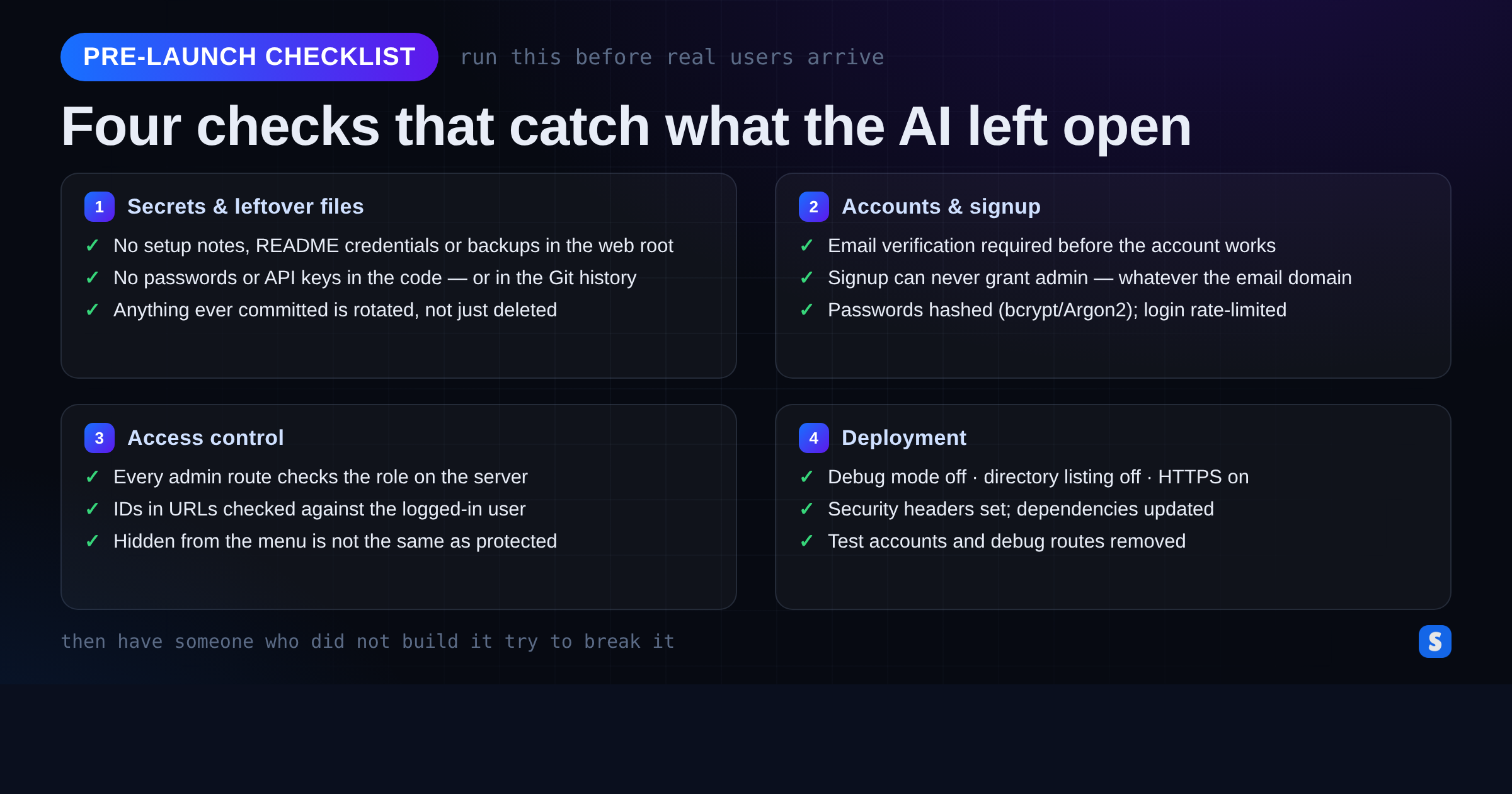
Our broader website security audit checklist covers the hosting and infrastructure side in more depth.
Common Mistakes That Undo Good Vibe Coding Security
- “The AI said it was secure.” It is predicting text, not auditing your system. Verify.
- “We’ll fix security after launch.” Attackers scan new domains within hours of a certificate being issued.
- “Nobody knows this subdomain exists.” Certificate transparency logs are public and searchable by anyone.
- “It’s a small business, we’re not a target.” Most attacks are automated and indiscriminate. Nobody chose you.
- Accepting AI fixes without reading them. A “fix” that silently disables a check is worse than the original bug.
Frequently Asked Questions About Vibe Coding Security
Is vibe coding safe for business applications?
It can be, but not by default. The code an AI produces is a first draft. For anything handling payments, personal data, or internal operations, treat AI output as work that must be reviewed and tested before launch.
Can I just ask the AI to check its own code for security issues?
It helps, and you should — the review prompt in Step 1 catches real bugs. But an AI reviewing its own work shares its own blind spots, and it cannot see your server configuration.
What is the single most common flaw in AI-built apps?
Missing or incorrect access control: the app checks who you are but not what you are allowed to do. It is also the flaw with the highest impact, because it usually leads straight to administrator access.
Does using a well-known AI model make the code safer?
Not reliably. Veracode tested more than 150 models and found security performance stayed roughly flat as models improved at writing functional code. The best reasoning models reached about 70–72% — still far from safe enough to deploy unchecked.
Ship Fast, but Do Not Ship Blind
AI has made building software faster than at any point in history, and that is a real advantage for businesses competing on speed. But attackers are using the same tools, and they only need one leftover file.
Good vibe coding security is not about slowing down. It is about adding one deliberate hour before launch: better prompts, a hunt for secrets, thirty minutes of trying to break your own login, and a clean deployment. That hour is the difference between an app that works and an app that holds.