
Most business owners find out their site had a problem at the worst possible moment: a customer sends a screenshot of a strange redirect, Google puts a warning in front of the shop, or the host suspends the account for sending spam. An audit is simply the decision to find those problems on your own schedule instead.
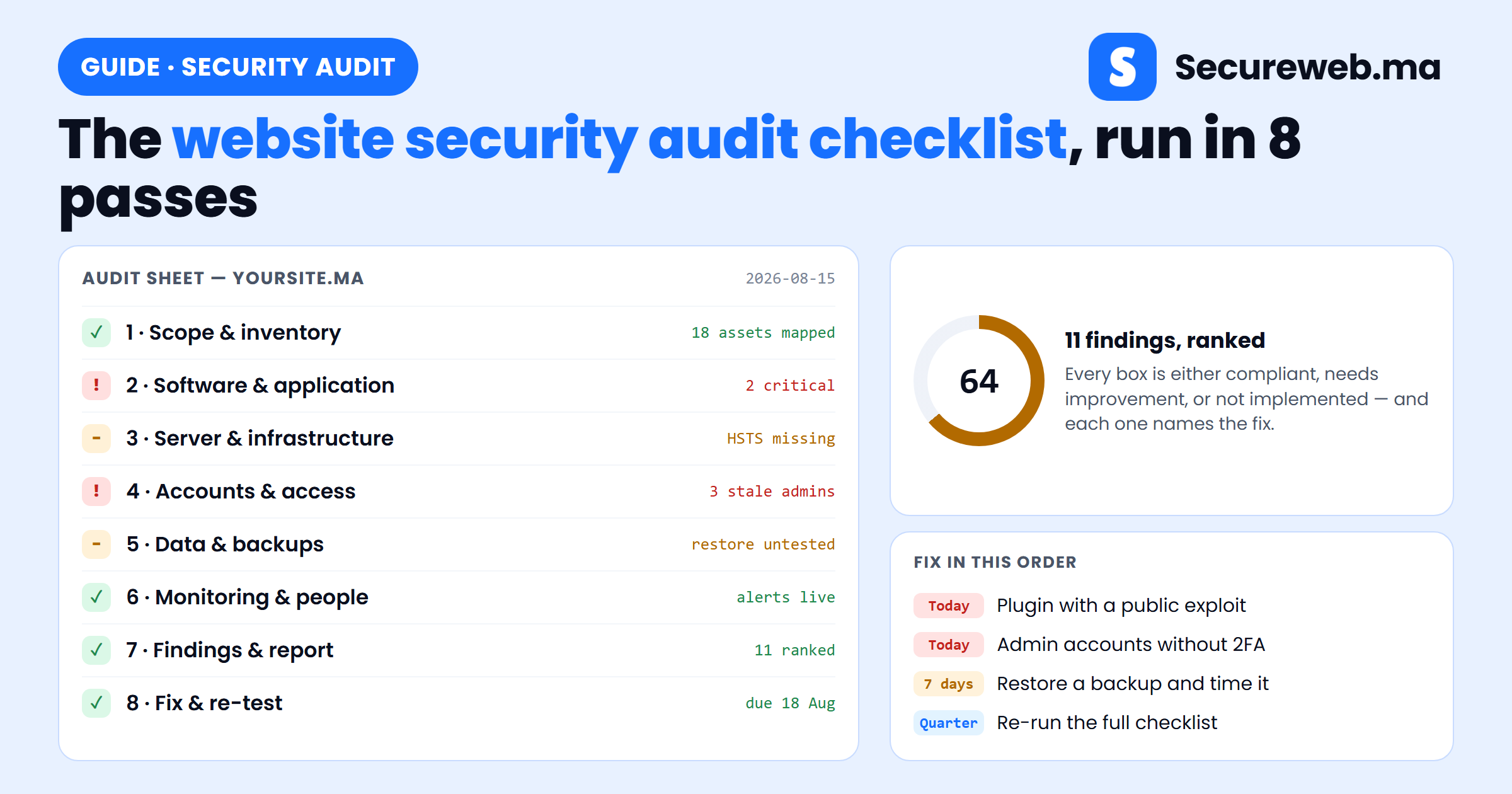
This guide turns the website security audit checklist into something you can actually run: eight passes over your site, in order, each one telling you what to open, what to look for, and what a pass or a fail looks like. Six of them include a screenshot of the screen you will be working in. Score every item as Compliant, Needs improvement or Not implemented as you go — by pass 7 that scoring turns into a ranked, dated plan rather than a vague sense of unease.
What a website security audit checklist is for
A website security audit is a systematic review of everything that keeps your online presence safe: the software, the server, the data, the accounts and the people. The checklist exists because memory is not a method. Without one you check the things you happen to think of — usually the same three things you checked last time — and miss the staging site nobody owns, the administrator account belonging to an agency you stopped working with, and the backup that has never been restored.
A good checklist gives you four things a spot-check cannot: consistency, so two audits are comparable; coverage of every layer rather than the visible ones; actionable output, because each item names a fix and an owner; and evidence, which is what regulators and enterprise customers ask for. If you handle personal data or take card payments, frameworks like GDPR and PCI-DSS expect documented, repeatable reviews — and in Morocco, the national cybersecurity and data protection rules point the same way.
Before you start
- A spreadsheet with one row per checklist item and columns for status, evidence, owner and due date. This becomes the report.
- Administrator access to the CMS, the hosting panel, the DNS registrar, and read access to your backup storage.
- A named owner for the audit — one person who runs it, even if others do the fixing.
- Roughly half a day for a small brochure site, two to three days for a shop with integrations. Book pass 5 separately: restore tests take time.
One rule for the whole exercise: audit first, fix later. It is tempting to stop and repair the first problem you find, but you will lose the thread and finish with a half-mapped site. Write the finding down, keep moving, and fix in ranked order in pass 8.
Pass 1 — Scope: write down everything you are auditing
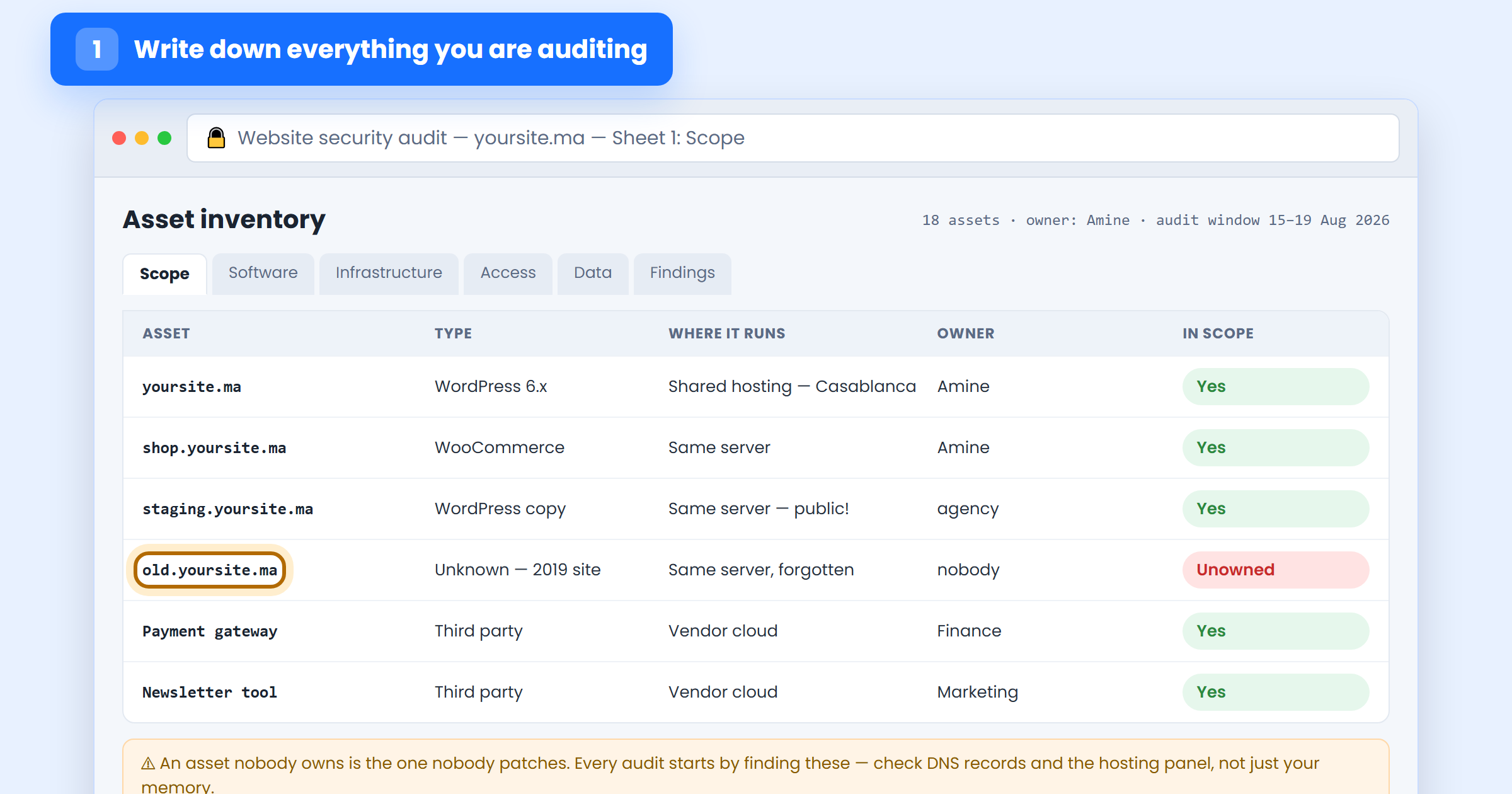
You cannot secure what you have forgotten you own, and the asset nobody owns is the one nobody patches. Start by listing every domain and subdomain in your DNS records and hosting panel — not from memory — plus every third-party service that holds your data or can act on your site.
For each row, record what it is, where it runs, who owns it, and whether it is in scope. Expect surprises: an old marketing microsite from 2019, a public staging copy of the shop indexed by Google, a subdomain pointing at a service you stopped paying for. Anything you find with no owner is a finding in its own right — decide now whether it is decommissioned or adopted.
Pass 2 — Software: check every version against what is patched
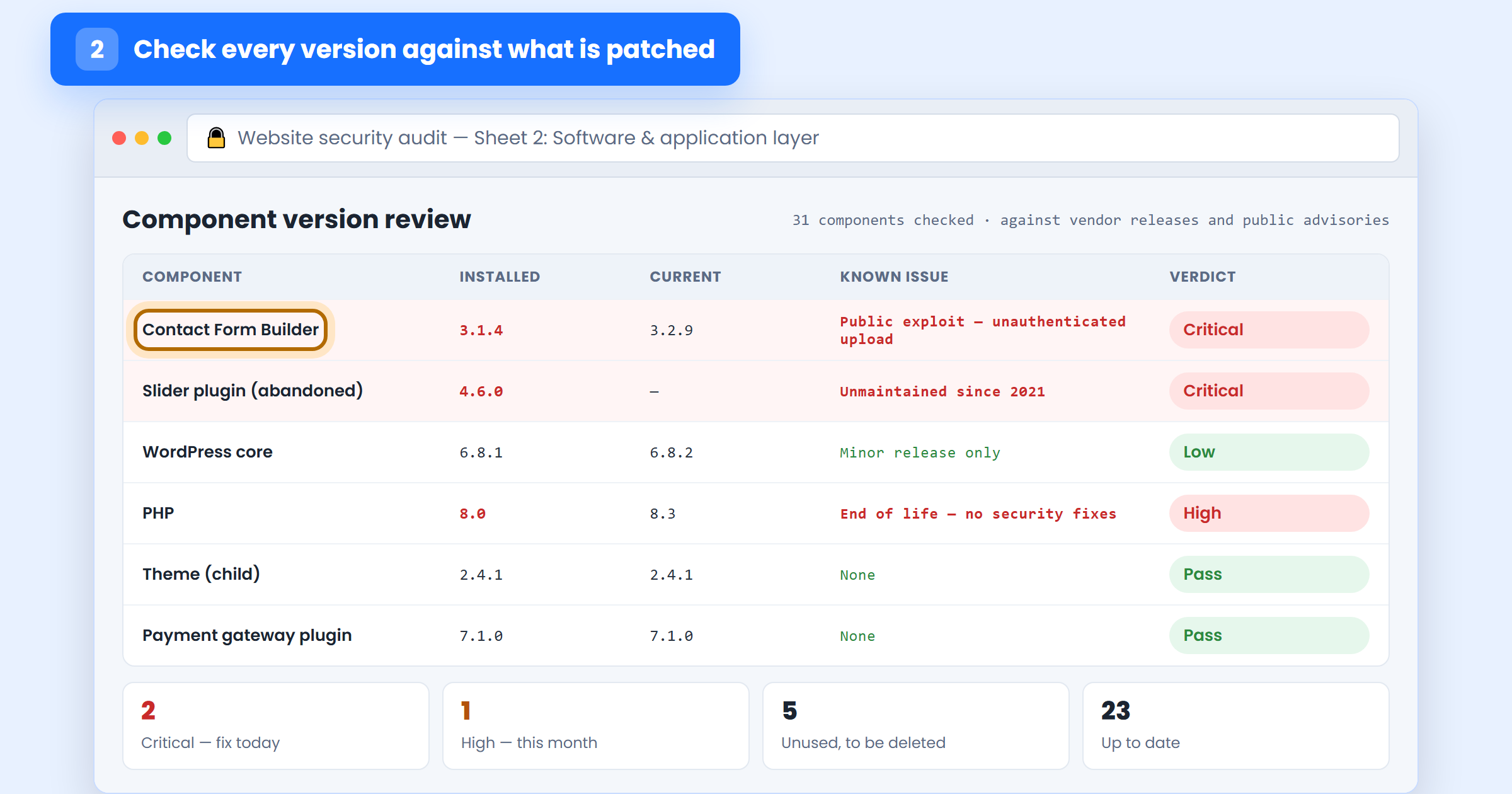
This is where most real-world compromises originate, so it deserves the most care. List every component with a version number — CMS core, each plugin, each theme, the PHP runtime, any framework or library your developer added — and compare the installed version against the current release.
Three questions per component. Is it out of date? Is there a published vulnerability for the version you are running — the plugin’s changelog and your security plugin’s vulnerability feed will tell you. And is it still maintained: a plugin with no update in two years is a permanent liability, whatever it does. Finish the pass by listing every component you do not use at all, active or not; deactivated is not removed, and that code is still on the server.
While you are here, check the application layer itself if you have custom code: are user inputs validated, are database queries parameterised, are uploads restricted by type and stored where PHP cannot execute? Our guide to securing a WordPress website covers the CMS-specific settings, and if any part of the site was generated by an AI assistant, the security gaps in AI-built apps are worth reading before you sign this pass off.
Pass 3 — Infrastructure: test the server, not just the site
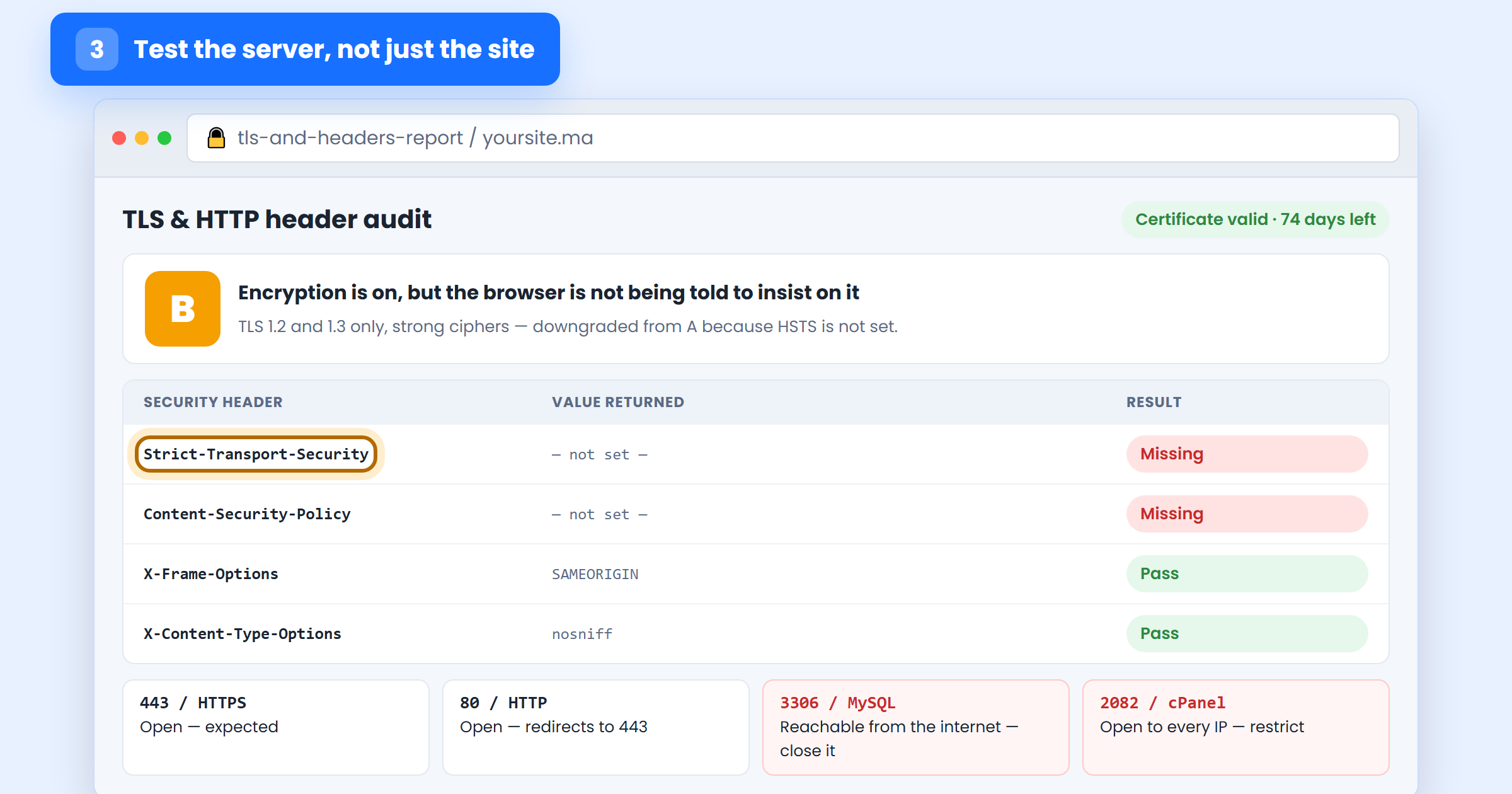
The site can be perfect and the server still be the way in. Four checks cover the ground for a typical hosted business site.
Encryption: is there a valid certificate on every hostname from pass 1, does HTTP redirect to HTTPS everywhere, is auto-renewal on, and is HSTS set? Headers: check for HSTS, Content-Security-Policy, X-Frame-Options and X-Content-Type-Options — cheap to add, and their absence is a standard audit finding. Exposure: which ports answer from the internet? A database port or a control panel open to every IP is a serious finding. Logs: are server and application logs kept, rotated, and stored somewhere an intruder cannot edit?
Add the web application firewall to this pass: is one in place, is it in blocking mode rather than logging mode, and can traffic still reach the origin server directly and bypass it? Our free website scanner gives you the outside-in view of most of these items in under a minute.
Pass 4 — Access: audit who can log in, and who still should
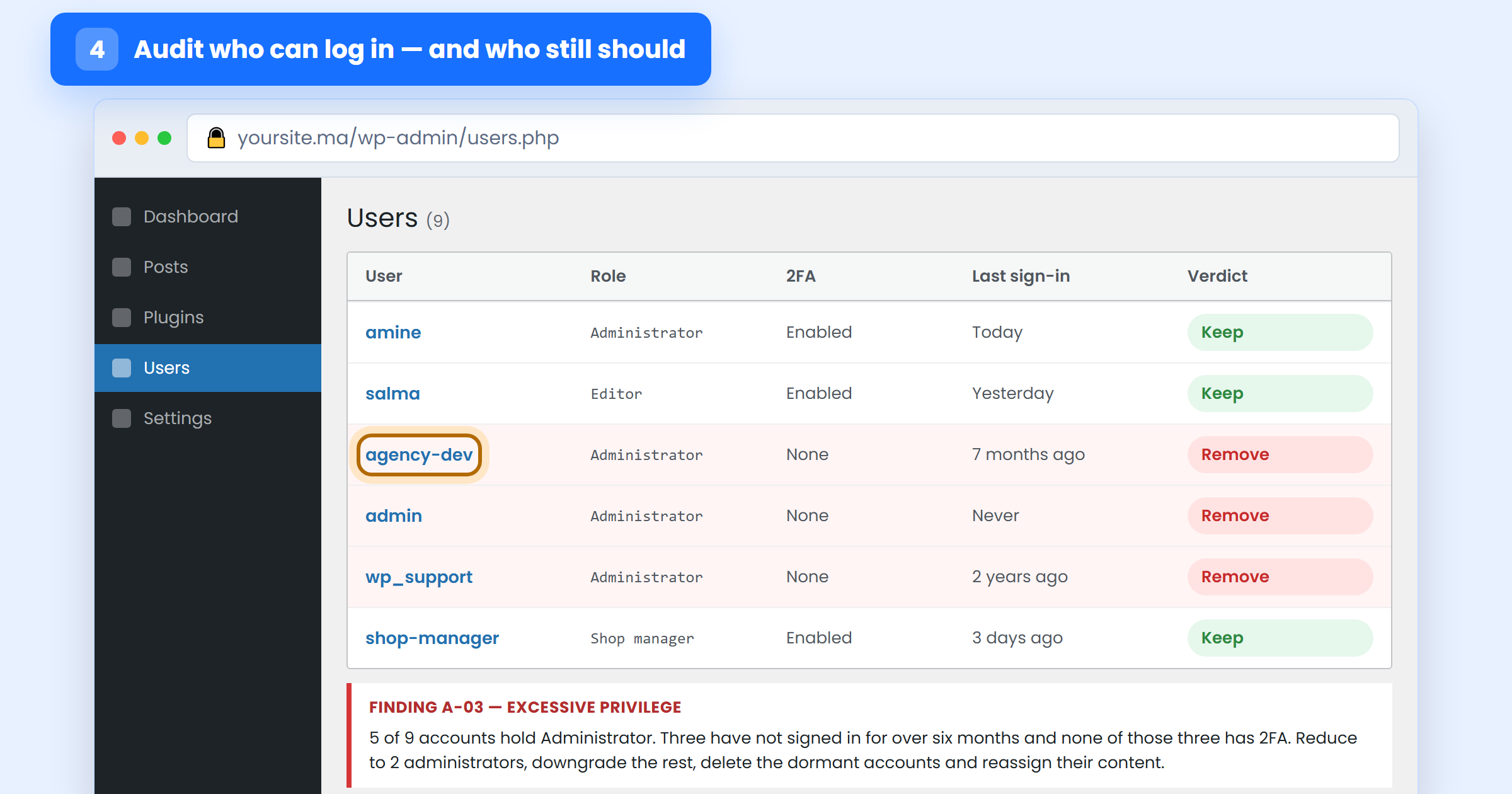
Open the users list and go through it line by line. For each account: who is this, do they still work with you, does their role match what they actually need, do they have two-factor authentication, and when did they last sign in?
The pattern to look for is the one nearly every audit finds: too many administrators, at least one belonging to a freelancer or agency from a finished project, and no second factor on any of them. Downgrade every account that does not need administrator rights, delete the dormant ones (reassigning their content first), and require 2FA on everything that remains — our two-factor authentication walkthrough covers the setup.
Extend the same review beyond the CMS: hosting panel logins, FTP and SSH accounts, database users, and API keys. Keys deserve particular attention — when were they last rotated, and does anything still work with a key that belonged to a former employee? Check password strength policy too; our password checker is a quick way to demonstrate to a sceptical colleague why “Societe2024!” is not strong.
Pass 5 — Data: restore a backup, do not just admire it
Start with what you hold. What personal data does the site collect, where is it stored, who can read it, how long do you keep it, and do you genuinely need all of it? Data you do not hold cannot be stolen, and minimisation is the cheapest control in this entire checklist.
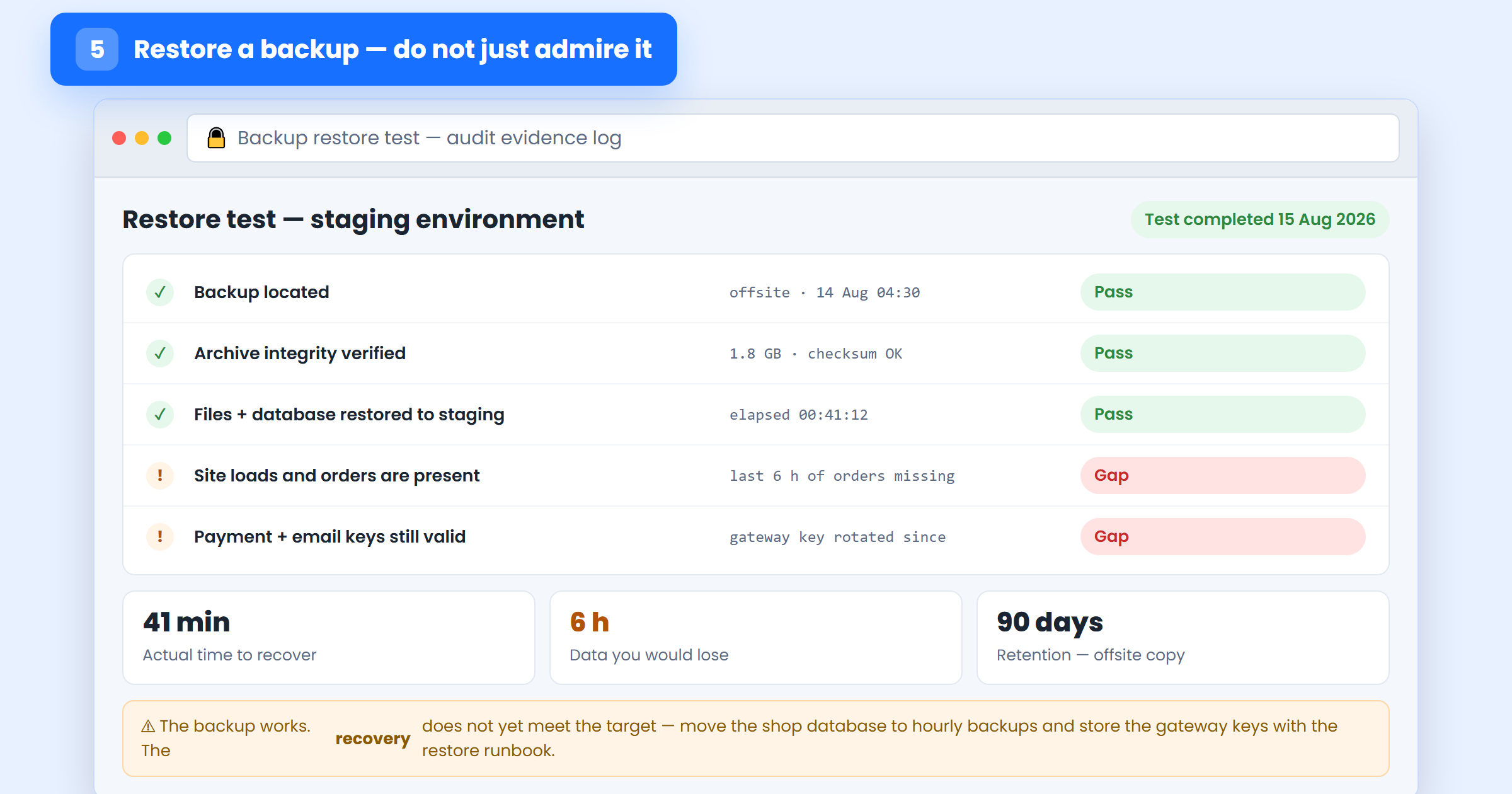
Then test recovery properly, because this is the item most often marked compliant on no evidence at all. Restore a real backup to a staging environment and time it. Confirm the site loads, the most recent orders or form submissions are present, and the keys and integrations still work. What you are measuring is not “does a backup exist” but how long recovery takes and how much data you would lose — and whether the offsite copy is genuinely off the server it protects.
Pass 6 — Monitoring, response and the people involved
This pass answers one question: if the first five layers fail tonight, how quickly would you know, and what would happen next?
On detection, check that file-change and malware scanning run on a schedule, and that alerts fire for the events that matter — a new administrator account, a modified core file, a plugin installed, repeated failed logins — and land in an inbox somebody reads. On response, the checklist item is a written procedure: who is called, in what order, who can take the site offline, where the hosting and registrar credentials are kept, and how customers would be told. It does not need to be long; it needs to exist before 2 a.m. on a Saturday.
Then the people, because they are the layer attackers now target first. Has everyone with access been trained to recognise a phishing email? Is there one account per person, with no shared logins? Do staff know not to sign in over public Wi-Fi without a VPN? Our free awareness test gives you an evidence score for this row rather than an opinion. Finish with vendors: which third parties can reach your data, and what do their own security commitments say?
Pass 7 — Rank the findings and write the report
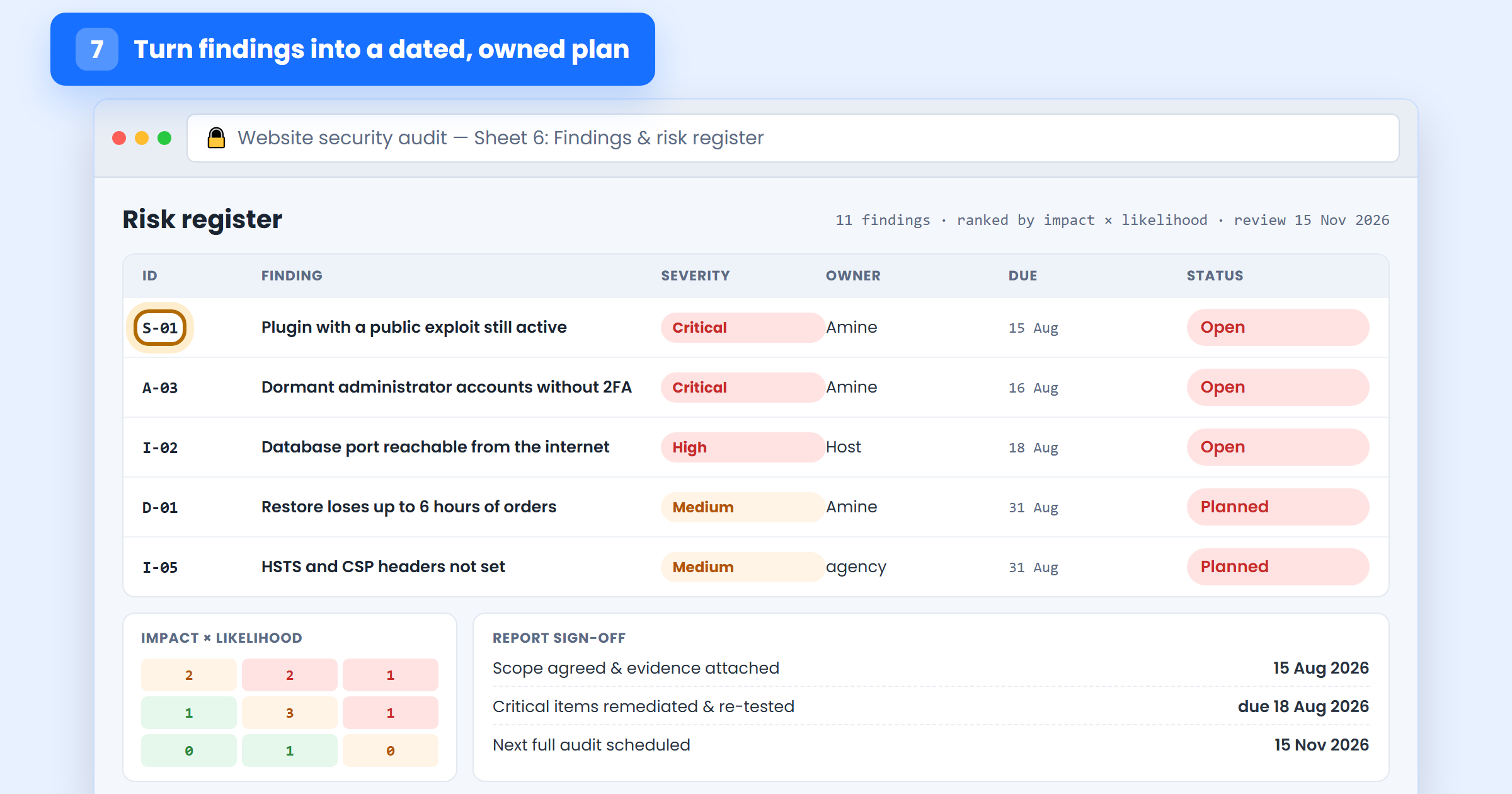
You now have a list of problems. Passes 7 and 8 are what turn it into security. Score each finding on impact (what happens if it is exploited) and likelihood (how easy it is to reach and how automated the attack), and sort by the two together. A publicly exploitable plugin outranks a missing header every time, however untidy the header feels.
Give every finding an ID, a plain-language description, a severity, a named owner and a due date — critical items in days, medium in weeks, low in the next quarter. That register is the report. Add a one-page summary at the front for whoever signs it off: what was in scope, how many findings by severity, and the three things being fixed first.
Pass 8 — Fix, re-test, and book the next audit
Work down the register in order. Take a backup before each change, fix one thing at a time, and record what you did in the evidence column — for an auditor, for your future self, and because “we patched it” and “we patched it on 16 August and confirmed the version” are different statements.
Then re-test, which is the step people skip. A fix that was applied to staging and never deployed, or a setting that reverted on the next update, is worse than a known gap because it is now marked closed. Re-run the specific check for every critical and high finding and only then change its status.
Finally, schedule the next one before you close the file: a full checklist quarterly, a short monthly check of updates, users, backups and alerts, and an immediate mini-audit after any big change — a redesign, a migration, a new payment integration, or an agency handover. If you want a lighter version of the monthly check, our 10-step guide to securing your website works well as the short form of this list.
The eight passes at a glance
- Scope — every domain, subdomain and third-party service, each with an owner.
- Software — versions, published vulnerabilities, abandoned and unused components.
- Infrastructure — certificates, security headers, open ports, firewall, logs.
- Access — accounts, roles, 2FA, dormant users, keys and their rotation.
- Data — what you hold, where, for how long, and a timed restore test.
- Monitoring & people — alerts, incident procedure, training, vendors.
- Findings — ranked by impact and likelihood, each with an owner and a date.
- Remediation — fix, re-test, record the evidence, book the next audit.
FAQ – Website security audit checklist
How often should I run the audit?
Run the full eight passes quarterly, plus a short monthly check of updates, users, backups and alerts. Run an extra mini-audit after any major change: a redesign, a migration, a new payment integration, or an agency handover.
Can I use the checklist without technical knowledge?
Yes for passes 1, 4, 6, 7 and 8, which are inventory, accounts, process and reporting. Passes 2, 3 and 5 need somebody comfortable in the hosting panel — a developer, your host’s support team, or a security consultant to interpret the findings.
How long does a full audit take?
Half a day for a small brochure site, two to three days for an e-commerce site with integrations, and one to three weeks for larger multi-server setups. Budget the restore test in pass 5 separately — it is the slowest single item.
What if I find a critical vulnerability mid-audit?
Stop and fix that one immediately — an actively exploitable flaw does not wait for your report. Patch it, check for signs it was already used (new admin accounts, modified files, unexpected redirects), then resume the audit where you left off.
Does the checklist cover GDPR and Moroccan data protection?
Pass 5 covers the core technical expectations — what personal data you hold, where, for how long, who can reach it and how it is protected — and pass 7 produces the documented evidence these frameworks ask for. Add any obligations specific to your sector or to the regulators you answer to.
Website security audit checklist: the bottom line
An audit is not a security product you buy once. It is the habit of looking, on a schedule, in the same order, and writing down what you find. The first run is always uncomfortable — everyone discovers a forgotten subdomain and an administrator account they cannot explain — and that discomfort is the entire value.
If you do nothing else this month, do three passes: list your assets (pass 1), review your accounts (pass 4), and restore a backup to a staging site (pass 5). Those three catch the failures behind most of the incidents we are called in to clean.
Want the audit done properly, with a written report and ranked findings you can hand to a developer? SecureWeb runs full website security audits and penetration tests for Moroccan businesses — and the free scanner is a good way to see where you stand before you commit to anything.