
A newly disclosed WordPress wp2shell vulnerability is being actively exploited across the internet right now, and if your business runs a WordPress site, this is not an update you can leave for later. On July 18, 2026, the WordPress security team patched two flaws in WordPress core itself — not a plugin, not a theme, but the software every WordPress site is built on. Chained together, the two flaws let an attacker take over a vulnerable site with no login credentials at all. Within 72 hours, researchers were already watching mass scanning, webshell uploads, and rogue admin account creation happen in real time.
What Is the WordPress wp2shell Vulnerability?
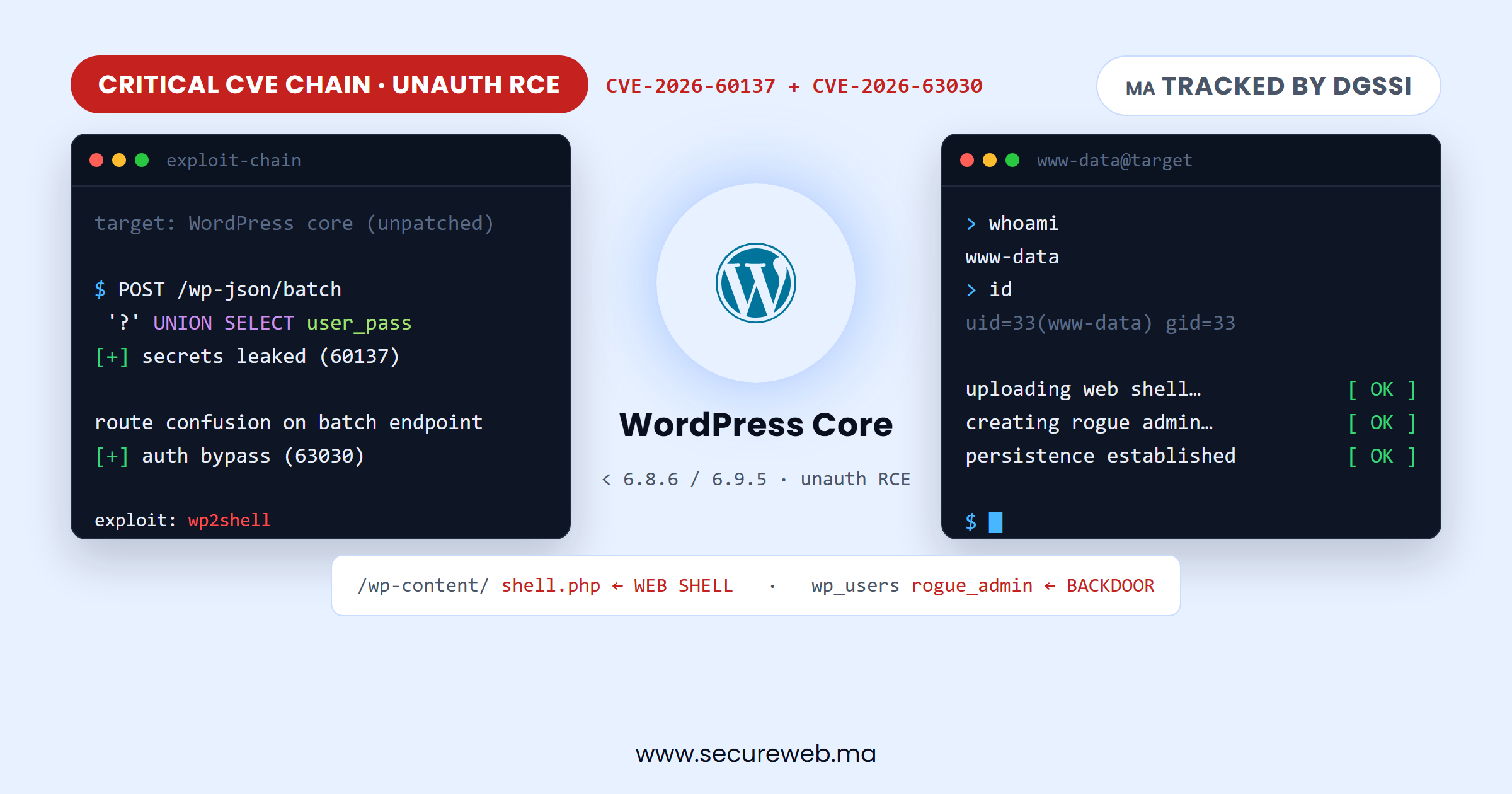
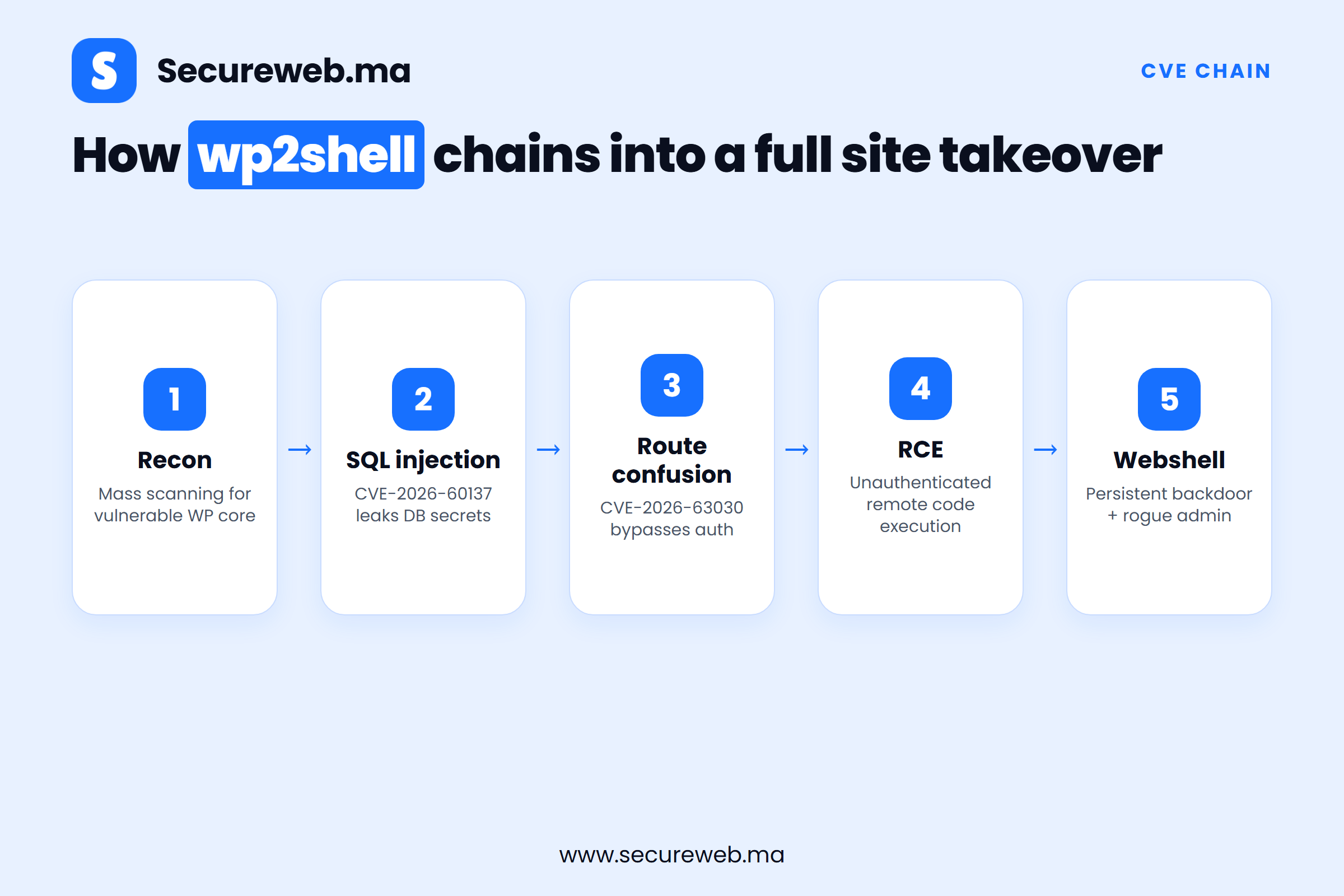
According to Help Net Security (July 18, 2026), the WordPress wp2shell vulnerability is actually two separate flaws in WordPress core that become far more dangerous when combined:
- CVE-2026-60137 — a SQL injection flaw. SQL injection means an attacker can send specially crafted input that tricks the website’s database into running commands it should never accept, potentially exposing usernames, password hashes, and secret keys.
- CVE-2026-63030 — a REST API “batch-route confusion” bug. WordPress’s REST API lets a single request bundle several actions together (a “batch”). This flaw lets an attacker exploit how WordPress resolves which action to run, bypassing authentication entirely and reaching functions that should require a logged-in administrator.
On their own, each flaw is serious. Chained together, security researchers found they let an attacker with no account, no password, and no prior access achieve remote code execution — meaning they can run their own code on the server, upload a webshell, and effectively own the site. Researchers dubbed the combined attack chain “wp2shell.”
Why an Unauthenticated RCE in Core Is the Worst-Case Scenario
Most WordPress security incidents SecureWeb covers involve a vulnerable plugin, a weak password, or a phishing email — problems with a clear, containable cause. This is different. It is a pre-authentication remote code execution flaw in WordPress core, the software layer underneath every plugin and theme. It doesn’t matter how strong your admin password is, how few plugins you run, or whether you have two-factor authentication enabled — none of that is checked before the attack even starts. WordPress powers a large share of Moroccan business, e-commerce, and institutional websites, which is exactly why this vulnerability class deserves urgent attention rather than routine patch-cycle treatment.
Who Is Affected
Any self-hosted WordPress site running a core version affected by CVE-2026-60137 and CVE-2026-63030 is at risk until updated. WordPress shipped fixes across its maintained branches on July 18, 2026: 6.8.6, 6.9.5, and 7.1-beta2. If your site’s core version is older than the fixed release for its branch, it is vulnerable.
Scale matters here. The Hacker News (July 21, 2026) reports that security firm Wiz scanned live WordPress installations and found 60% were initially vulnerable, with roughly 25% directly exposed to the internet — meaning reachable by any attacker, anywhere, without needing network access first. That is a very large attack surface for a flaw this severe.
Active Exploitation: What Security Researchers Are Seeing Right Now
This is not a theoretical risk. By July 19–21, 2026 — within a day or two of disclosure — attackers were already mass-scanning the internet for vulnerable installs. Watchtowr’s honeypot network (decoy servers designed to attract and log attack traffic) recorded tens of thousands of exploitation attempts originating from IP addresses in multiple countries. Confirmed attacker behavior includes deploying webshells (hidden scripts that give an attacker a persistent command interface on the server) and creating rogue administrator accounts to maintain access even after the original flaw is patched.
The Moroccan Angle: DGSSI Is Tracking This Vulnerability
Morocco’s national cybersecurity authority, DGSSI (Direction Générale de la Sécurité des Systèmes d’Information), currently lists an entry on its national security bulletin titled “Vulnérabilités critiques dans le CMS WordPress” — direct confirmation that this issue is being tracked at the national level, not just by international vendors. For any Moroccan organization running WordPress — SMEs, e-commerce stores, healthcare providers, financial institutions, or government sites — a DGSSI bulletin listing is a strong signal that this is not a “wait and see” situation. It is worth treating as a formal call to action to check, patch, and verify your WordPress installations without delay. This is also a good moment to review your organization’s broader compliance with Moroccan cybersecurity laws, particularly if you handle customer or financial data.
How to Patch the WordPress wp2shell Vulnerability
Patching this specific flaw is only one piece of a broader approach to keeping WordPress secure — see SecureWeb’s guide on how to secure a WordPress website for additional hardening steps beyond this incident.
- Check your WordPress version. In wp-admin, go to Dashboard → Updates, or Dashboard → At a Glance, to see your current core version.
- Update to a fixed release. Depending on your branch, that means 6.8.6, 6.9.5, or later (7.1-beta2 or the eventual stable 7.1 release once available).
- Back up before updating — standard practice, but especially important here given active exploitation; you want a clean restore point if something goes wrong.
- Enable automatic core updates if your hosting setup supports it, so future security releases apply without waiting on manual action.
- If you use a managed WordPress host, confirm with them directly whether the patch has already been applied at the platform level — many managed hosts push security-critical core updates automatically, but you should verify rather than assume.
- If you run a custom or heavily modified WordPress install (custom REST routes, a multisite network, or a development team maintaining the codebase), loop in your developers now — they may need to verify custom code doesn’t reintroduce similar issues.
Signs Your Site May Already Be Compromised
Because mass exploitation began within days of disclosure, it’s worth checking for compromise even after you patch:
- Admin user accounts you don’t recognize (Users → All Users in wp-admin).
- Unfamiliar PHP files, especially in
/wp-content/uploads/— uploads folders shouldn’t normally contain executable code. - Unexpected outbound traffic or unusually high server load.
- Changes to core files that don’t match a legitimate WordPress update.
If you find any of these signs, patching alone is not enough — the attacker may already have a foothold. Treat it as a suspected breach: isolate the site, preserve logs, and follow SecureWeb’s guide to restore a hacked website, or bring in an incident response specialist to investigate before continuing operations normally.
From Two-Factor Authentication to Patching: Two Layers, Not One
SecureWeb’s recent guide on setting up WordPress two-factor authentication covers an important but different layer of defense: protecting the login form so a stolen or guessed password isn’t enough to get in. The wp2shell vulnerability is a reminder of why that’s only one layer among several — this attack chain bypasses the login form entirely, so 2FA does nothing to stop it. Strong login security and a current, patched WordPress core are complementary, not substitutes for each other. A well-secured WordPress site needs both.
What Moroccan Businesses Should Do Now
- Update WordPress core immediately to 6.8.6, 6.9.5, or 7.1-beta2, whichever applies to your branch.
- Check the DGSSI national bulletin for the latest guidance on this and related advisories.
- Audit your admin user accounts for anything unrecognized, right after updating.
- Scan for webshells and unfamiliar files, particularly in uploads directories.
- If you cannot update immediately (e.g., compatibility testing is required), consider a web application firewall as a temporary mitigation — it is not a substitute for patching, only a stopgap.
- Consider a professional security audit or penetration test if your site handles customer data, payments, or sensitive records. Run through SecureWeb’s website security audit checklist — this incident is a good trigger to confirm there isn’t a second unpatched issue sitting alongside this one.
- Keep monitoring — attackers who scanned in the first wave may return to test whether a site was patched.
The Bottom Line
The WordPress wp2shell vulnerability is exactly the kind of flaw that turns a routine “update available” notification into an urgent task: unauthenticated, remotely exploitable, in core, and already being mass-exploited days after disclosure. If you manage a WordPress site — or aren’t sure who does — checking your core version today is a five-minute task that can prevent a much longer, costlier incident. If you’d like a second set of eyes, SecureWeb’s website security audits and incident response services can help confirm your site is patched and clean.
Frequently Asked Questions
What is WordPress wp2shell?
“WordPress wp2shell” is the name security researchers gave to the combined exploitation of two WordPress core vulnerabilities, CVE-2026-60137 (SQL injection) and CVE-2026-63030 (REST API batch-route confusion), which together allow an unauthenticated attacker to achieve remote code execution on a vulnerable WordPress site.
Which WordPress versions are affected by WordPress wp2shell?
Versions predating the fixes released on July 18, 2026 — WordPress addressed the issue in 6.8.6, 6.9.5, and 7.1-beta2. If your installed core version is older than the fix for your branch, update immediately.
How do I know if my WordPress site was already compromised?
Check for admin accounts you don’t recognize, unfamiliar PHP files (especially in the uploads folder), unexpected server load or outbound traffic, and any core files that don’t match a legitimate update. If you spot any of these, treat it as a suspected breach and bring in a specialist rather than assuming a simple cleanup will suffice.